Extracting Documents From a Live ECM Without Crashing It: A Fast2 Field Methodology
Part 1 of 3. This article covers bulk extraction against a source that users are still hitting every minute. Part 2: Delta Migration Methodology → covers how the target catches up before cutover, and Part 3: The Migration Ledger → covers the record that tells you what's done, what's left, and what to re-run.
Moving the documents is the easy part. Moving them while the source is still serving production traffic is where migrations go sideways. Three methodologies handle it, from safest to riskiest: Clone & Sweep, Snapshot & Drip, and Live Trickle. Pick one before you write a single extraction task. On most engagements I reach for Snapshot & Drip. It gives you a stable read surface, throughput you can predict, and a clean line between history and delta that makes Part 2 tractable. For an API-bound source, plan around 50 to 100 documents per second per extraction thread. That's a field-measured benchmark across FileNet, Documentum, and CMIS sources, and it sits at the same order of magnitude as TSG's published multi-billion-document FileNet case study. Get this wrong and you end up like TSB Bank in 2018: roughly £330M in remediation, the CEO out, and the CIO personally sanctioned by the PRA.
The problem in one paragraph
Every migration deck shows the same arrow: old box on the left, new box on the right, "Fast2" in the middle. The deck never shows the third box behind the old one. Branch managers, claims adjusters, call-centre agents, nurses. All of them still opening documents in the source system while your extraction job hammers the same database. TSB Bank's 2018 cutover is the reminder everyone cites. Up to 1.9 million of its 5.2 million customers were locked out of digital banking. Roughly £330M in remediation. A £48.65M fine from the FCA and PRA. And a PRA Final Notice in April 2023 imposing a personal sanction of £81,620 on the former CIO. Slaughter and May's independent review named poor migration-team access to the source system among the root causes. Everything here is built around not repeating that.
Load surfaces
Before you pick a methodology, picture what the source ECM actually feels when you point an extractor at it. There are three load surfaces, and you hit all of them at once.
- The application API.
IDocument.fetch()in P8,DfDocument.getObject()in Documentum, the CMIS endpoint in Alfresco. Each call burns a session, a thread on the application server, a connection in the pool. Concurrency caps usually sit at 30 to 60 sessions per node. Cross that and the queue forms behind your users, not behind you. - The metadata database. Oracle, SQL Server, DB2. Your scan pass is a long
SELECT ... WHERE created_at < :high_watermark ORDER BY id. Without an index hint, you get a full table scan competing for buffer cache with the OLTP queries the business is running. - The blob store. NAS, IBM TSM, Centera, S3-compatible object store. This is where the volume lives. Naive parallel reads saturate the NIC on the NAS head before anything else gives way. A 10 GbE link can flatline under eight extraction threads pulling 4 MB TIFFs.
Hit all three surfaces at the same time, with the extractor and end users competing, and user-facing latency degrades well before any infrastructure alarm fires. The retrospectives agree on the failure pattern: API-only extraction against a live source doesn't hold up at scale, and load testing you only run at cutover lands too late to fix anything (ArgonDigital's ECM migration lessons-learned series).
Three named methodologies
A. Clone & Sweep
You stand up a full copy of the source environment, application servers, database, blob store, restored from backup at a fixed point in time. Fast2 connects to the clone. The live source never sees your traffic.
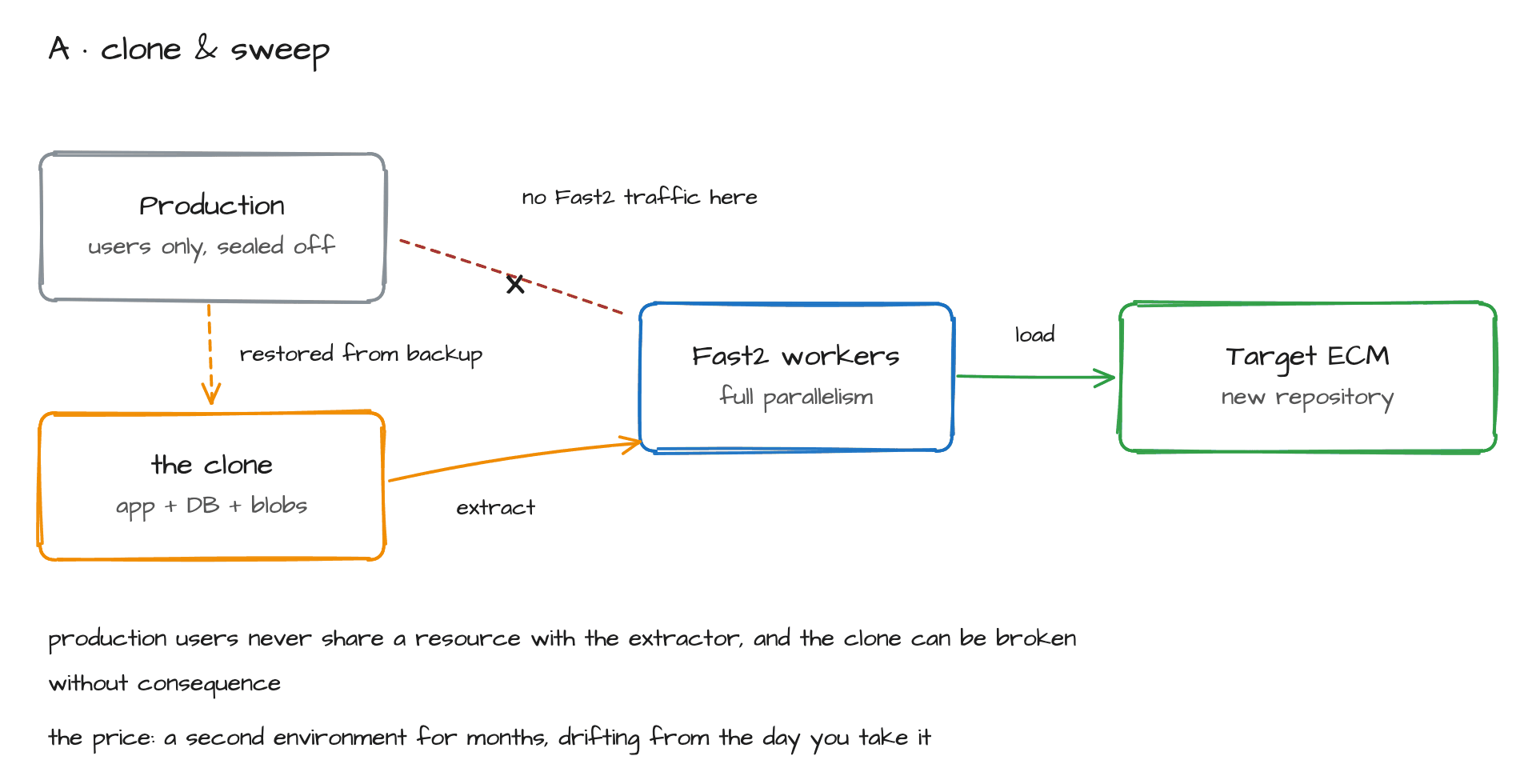
Upside: zero production impact, full freedom on threading and parallelism, and a sandbox the migration team can break without consequence. Downside: cost. You pay for a second environment for months. Standing it up isn't cheap on effort either. A P8 farm with TSM, Verity, and a 200 TB FileStore is not a one-week job. And then there's drift, which starts the moment you take the clone.
When to use: regulated industries where source-side downtime is contractually forbidden. Banking core, hospital EMR, public-sector citizen services. The Ameritas migration of 670M documents from Documentum to CARA on AWS used this shape. The 50 to 100 docs/sec/thread anchor below is consistent with TSG's published billion-document FileNet engagement and with anonymised field measurements on comparable clone deployments.
When to avoid: when the storage cost of doubling 4 TB+ of blobs kills the business case, or when the clone takes longer to refresh than the migration window itself.
B. Snapshot & Drip (the default)
This is my default on most engagements. You take a point-in-time snapshot of the source: a storage snapshot of the blob store (NAS, S3 versioning, Snowball if you're crossing clouds) plus a logical export of the metadata database (expdp for Oracle, bcp or BACPAC for SQL Server, db2move for DB2) into a staging zone. Fast2 reads only from the staging zone. Production never feels the extractor.
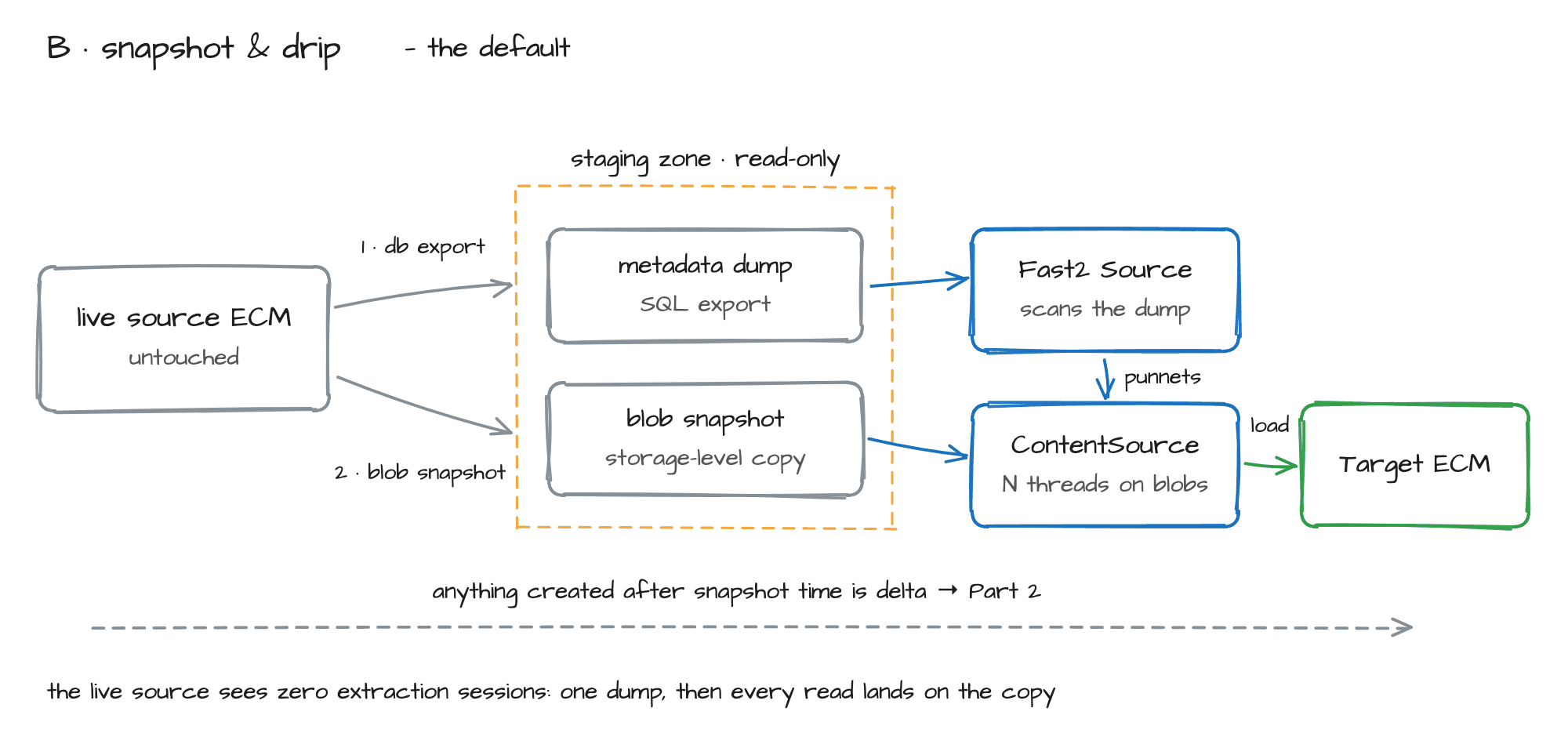
The pattern maps cleanly onto Fast2's two-stage extraction model. The Source task scans the metadata dump, which is single-threaded, cheap, and deterministic. It emits punnets (Fast2's term for a pivot XML record carrying document identity, metadata, ACLs, and a blob pointer) into the broker queue. ContentSource workers, scaled horizontally across machines through queue routing, pull punnets and fetch the actual bytes from the blob snapshot. You can run twenty ContentSource threads against a snapshot and nobody in production will notice.
Why it earns the default slot:
- Stable read surface. The snapshot doesn't change under you. Restarts resume from the last committed punnet ID in the broker queue, so an interrupted campaign re-scans only the tail. No clock skew. No soft-delete edge cases. None of the "did this document still exist when I read it?" questions that eat your afternoon.
- Decoupled throughput. Saturate the staging zone. That's what it's there for. The 50-to-100 docs/sec/thread figure that haunts API-bound extraction turns into a floor instead of a ceiling. Maretha's FileNet-to-Nuxeo work sustained 120M+ documents per day across two consecutive migrations of 1.4B and 1.6B documents. Hash-keyed blobs travelled by Snowball; metadata streamed through Kafka into Nuxeo Stream (Maretha / Nuxeo case study, 2022).
- Clean separation of history and delta. Everything in the snapshot is history. Anything created in the source after snapshot time is delta. That boundary is what makes the delta phase in Part 2 tractable.
When to use: as your default. Any volume above ~10M documents, any source you don't fully control, any project with a sponsor exposed to the TSB-style regulatory tail.
When to avoid: when the source has no usable snapshot mechanism (some legacy archive appliances), or when regulatory rules forbid copying production data into a staging zone without same-region encryption guarantees you can't yet meet.
C. Live Trickle
The fallback. Direct extraction from the production source, with aggressive throttling, scheduled time windows, circuit-breaker patterns, and a kill switch the source team controls.
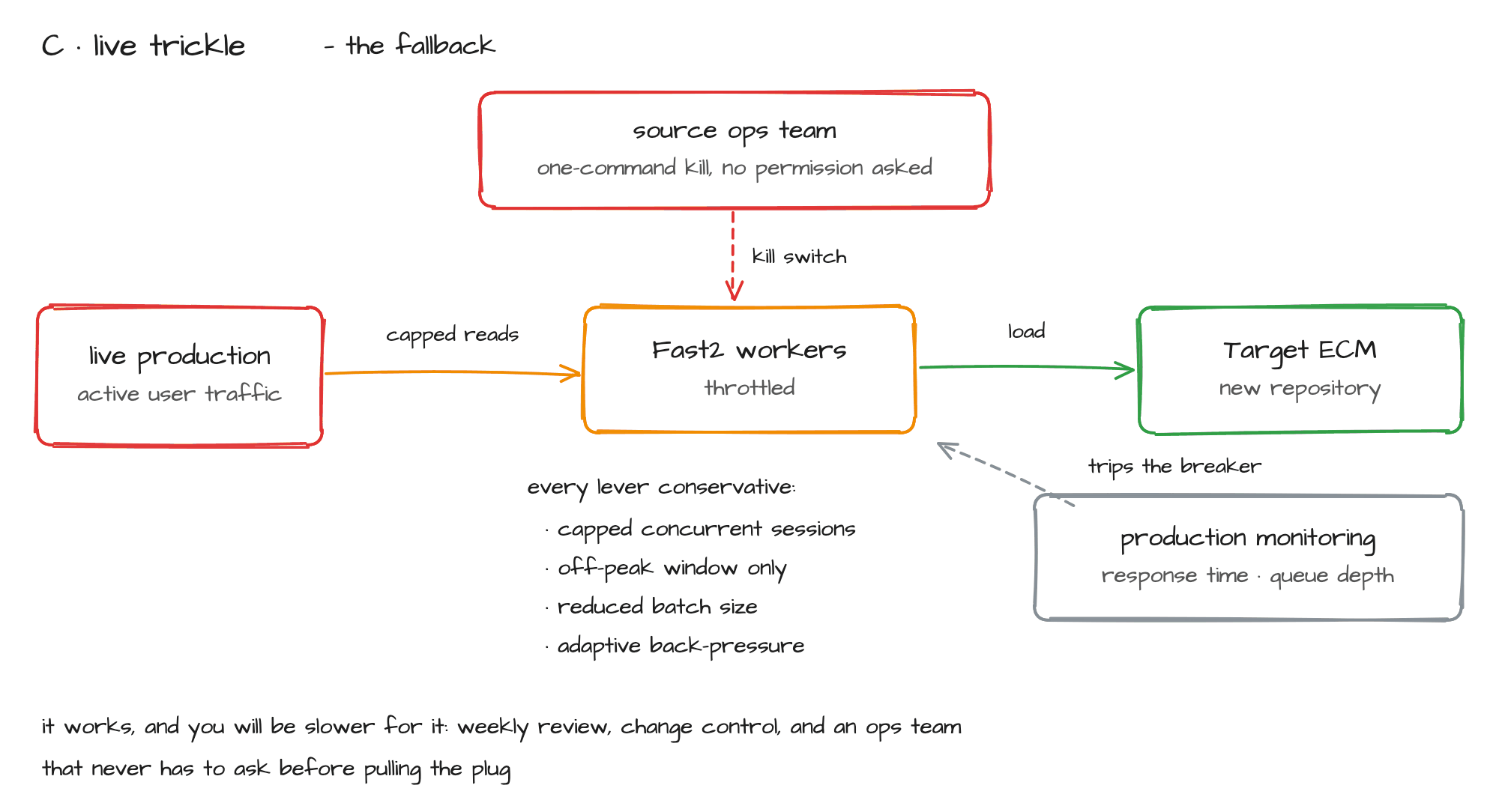
Live Trickle is what you do when neither A nor B is on the table. Usually that's because the customer's infrastructure team can't or won't provision the storage and compute for a clone or staging zone, and the calendar won't wait. It works. But every operational lever has to sit conservative and get reviewed weekly. You'll be slower. You'll be more careful. And you'll spend more time in change-control meetings than you planned for.
When to use: small-to-medium volumes (low millions), sources with mature concurrency governance (Oracle Resource Manager, SQL Server Resource Governor) you can lean on, and tight operational coupling with the source team.
When to avoid: any system with a 24/7 user base whose SLAs you don't control. Postbank's Magellan/Unity migration is the cautionary tale. The January 2023 wave-2 cutover triggered a multi-day online-banking outage, a BaFin reprimand, and executive bonus cuts.
Decision matrix
| Scenario | Volume | User pressure | Recommended methodology |
|---|---|---|---|
| Regulated retail bank, core records | 100M to 1B+ | 24/7, regulator on your back | A. Clone & Sweep |
| National health insurer, claims archive | 500M to 4B | Office hours, weekend windows OK | B. Snapshot & Drip |
| Hospital EMR, active patient records | 10M to 100M | Strict 24/7, life-critical | A. Clone & Sweep |
| Public sector, multi-agency consolidation | 50M to 500M | Office hours | B. Snapshot & Drip |
| Insurance back-office, legacy P8 to cloud ECM | 100M to 1B | Business hours | B. Snapshot & Drip |
| Pharma / life sciences, audit-traceable | 1M to 50M | Business hours | A or B, depending on validation rules |
| Mid-market manufacturer, internal users | 1M to 10M | Office hours, flexible | C. Live Trickle, with off-peak windows |
| Multi-region archive, no live consumers | Any | None | B. Snapshot & Drip (or direct dump to Fast2) |
A useful gut-check. If the sponsor can't tolerate any measurable degradation in source response time during business hours, you're in column A. If they can live with it during a Saturday-night window, you're in column B. If they shrug, you might get away with column C.
Throttling and governance: the controls that matter
Whichever methodology you pick, the same Fast2 levers decide whether your extraction stays inside the envelope you negotiated. The trick is picking values that match the load surface you're actually hitting, not the one in the sizing spreadsheet.
| Fast2 lever | What it controls | Practical guidance |
|---|---|---|
| Threads per task | Concurrency inside a single worker | Start low (4 to 8) on Source tasks. ContentSource can usually go higher (16 to 32) if reading from a snapshot. Halve it if you are hitting prod. |
| Batch / page size | Records fetched per API round-trip | Match to source page-size sweet spot. P8 likes 100 to 500; CMIS likes 50 to 200. Bigger pages reduce round-trip overhead but increase per-call memory. |
| Queue routing across workers | Horizontal scale-out to extra machines | The broker (port 1789) dispatches punnets to whichever worker picks them up. Add machines and you don't reconfigure the campaign. |
| Time-window campaigns | When extraction is allowed to run | Schedule scan-heavy work outside business hours. Fast2 campaigns are restartable, so you don't lose progress when you pause. |
| Two-stage split: Source vs ContentSource | Decouples cheap metadata pass from heavy bytes pass | The single biggest knob. Do all your scans first, queue everything, then turn on ContentSource workers under controlled throttling. |
| Duplicate prevention booleans | Prevent duplicate, Prevent overwriting, Update only, Auto rename on the loader side | Set explicitly per campaign. Defaults are not what you want at scale. |
| Incremental load support | Re-running a campaign without re-extracting everything | Documented in the Uxopian FAQ. This is what makes Article 2's delta phase tractable. |
Two layers around Fast2 are non-negotiable on a live source.
Source-side resource governance. Lean on what the database already gives you. Oracle Resource Manager can cap the migration user to a fixed share of CPU and parallel-query slots; SQL Server Resource Governor does the same with a dedicated workload group. Defence in depth. Fast2's throttling is your primary control, but you still want the DBA's hand on a second valve.
Joint runbook and a kill switch the source team owns. The migration team does not get to decide that extraction keeps running after the source team says stop. Write that into the runbook on day one. The source-side ops engineer gets a one-command kill (a docker stop on the worker, drain the queue, or pause the campaign in the Fast2 UI), and they never have to ask permission to use it.
Reconciliation as a deliverable. Don't bury reconciliation in a side report. Ship it as a numbered artifact: a manifest of every source ID, target ID, SHA-256 hash, byte count, and extraction timestamp; counts reconciled per business domain; a sampled set of rehydrated documents opened end-to-end in the target. The MAN Energy Solutions Documentum-to-OpenText project on ~2M documents treated audit-compliant traceability as a deliverable instead of a by-product. That's the bar. Fast2's NoSQL backend (Elasticsearch + Kibana on port 1791) hands you the dashboarding for free, so use it.
Keep programme state out of the source. This one is a load-surface control, even though it looks like bookkeeping. The moment nobody has written down what has already been migrated, every "how far along are we?" and every "what's left?" turns into another scan of the source's metadata database — the same database you have spent this whole article protecting. Maintain an external inventory instead, one row per source object with its state, and the source gets queried once for inventory and once per document for content. Never again to answer a question you could have answered yourself. On Live Trickle that is the difference between a defensible load profile and an incident.
That inventory is also what makes a later delta phase and the eventual decommissioning tractable, and it is where the "mark documents as migrated" pattern actually belongs. Fast2 supports it as a pattern, not a one-click feature. Schema, atomic claim, lease handling, and the audit caveats are in Part 3: The Migration Ledger; the source-side variant, where you write the flag back onto the source object, is in Part 2 with its DBA sign-off and rollback considerations.
A planning baseline you can defend
Sizing conversations always circle back to one question: how fast does Fast2 actually go?
For API-bound extraction (Clone & Sweep against a cloned app server, or Live Trickle against prod) plan around 50 to 100 documents per second per extraction thread. That anchor is a field-measured benchmark from our own engagements across FileNet, Documentum, and CMIS sources, and TSG's publicly published multi-billion-document FileNet case study confirms migrations at this order of magnitude are real. Add a dedup shortcut on already-known content and the heavier path can climb toward the top of that band.
For dump-bound extraction (Snapshot & Drip against a staging zone) the source isn't the bottleneck anymore. Throughput is governed by the staging zone's read bandwidth and the target's ingest capacity. That's how 120M docs/day numbers (Maretha) become reachable, because the source is out of the loop.
A defensible back-of-envelope: 100M documents at 50 docs/sec/thread is about 23 days on a single thread, about 6 days on a 4-thread campaign, roughly 2 days on 16 threads. Then multiply by your own caution factor, usually 1.5x to 2x, to cover retries, business-day-only windows, and reconciliation overhead. Equisoft's published insurance-migration baseline of 1 to 3 years end-to-end covers the whole programme, and most of that range is design, validation, dual-run, and cutover. Extraction is one workstream inside it.
From the field: what these rates look like in practice
The per-thread anchor above is for sizing arithmetic. What sponsors actually want is the shape of real campaigns, measured as aggregate end-to-end throughput: the whole pipeline, across however many threads and workers it was running. Not per thread.
Read them as ceilings under specific conditions, not promises. Every figure below is hostage to the environment around Fast2: the Fast2 server's own sizing (cores, RAM, worker count), how aggressively the flow was tuned, the source system's availability and DB optimisation (indexes on the scan predicate, resource-governor caps), the destination's resistance to sustained write load, and the network linking them. The same map can run at 8 or 150 docs/sec depending on what it does and what it runs against. Profile your own source before you commit to a date.
Mind what a "document" counts as. These rates count documents as the Fast2 UI reports them. A document the UI tallies as 1/sec may carry ~100 versions behind it, each with its own metadata set, folder references, content blob, and security/ACL details, all of which Fast2 still has to read, map, and write. A counter reading 150 docs/sec can therefore represent far more underlying objects actually moved. When you compare these figures against another tool's numbers or against your own targets, make sure both sides are counting the same thing.
| Speed | Unit | Workload & context |
|---|---|---|
| ~8 | docs/sec | Flow with heavy datamapping and content conversion. Every document is transformed and re-rendered in flight, so conversion CPU, not extraction, sets the pace. |
| ~70 | docs/sec | Standard, non-optimised workflow: straight metadata-plus-blob, no conversion, no special tuning. A reasonable default to quote before you have profiled the source. |
| ~150 | docs/sec (sustained) | Campaign tuned and horizontally scaled to take full advantage of Fast2's two-stage, queue-routed architecture: ~3.8M documents in a single 7-hour working day. The upper end of what we have measured. |
| ~150 | docs/sec (peak) | On-premise FileNet to FileNet-on-Cloud. Same mark as the tuned ceiling: past ~150 docs/sec Fast2 is rarely the constraint. The source database, the destination's tolerance for sustained writes, or the network gives way first, so the rate eases back from the peak as the run goes on. |
| ~3.1M | docs/day (~1.1 TB/day) | Sustained daily rate on a large insurance-carrier FileNet ECM consolidation: ~290M documents, ~96 TB, migrated to 99.77% completion across the estate. |
Hand-off to Part 2
Bulk extraction is half the job, and on a calendar it's usually the shorter half. While Fast2 sweeps through the snapshot, the source ECM keeps producing new documents. Claims filed Monday morning, charts updated Tuesday, contracts uploaded Wednesday. Your target has to catch up to now before anyone can cut over. That's the delta migration phase: change-data-capture vs watermark/timestamp vs source-side flagging, dual-run validation, reconciliation under load, and the cutover patterns (big-bang, phased, blue-green) that decide whether a project ends like TSB or like the 1.3B-document IBM-to-Alfresco-on-AWS insurer migration that Fast2 delivered in 22 months.