This version requires the following software prerequisites:
- ARender: 2026.3.1
- Redis: 8.8
- OpenSearch: 3.6.0
Legend
- 💻 Native feature (enabled by default)
- ⚙️ Feature requiring configuration
- 👨💻 Feature requiring development
- 👑 Premium feature
Overview
Version 2026.2.0 gives business teams more autonomy. Six new administrative roles make it possible to delegate part of the administration to key users without granting them full rights. Search becomes more precise with three new operators: "does not contain", "is empty" and "is not empty". In eProcess, several existing documents can now be attached to a case file in a single action. This version also makes integration work easier: new JavaScript API methods allow the interface to be customized without overriding product scripts. Finally, this version embeds the ARender 2026.3.1 viewer and includes several security fixes.
Upgrade Notes
The major technical changes in this version are detailed in the upgrade notes available here
For users
💻 Administrative roles
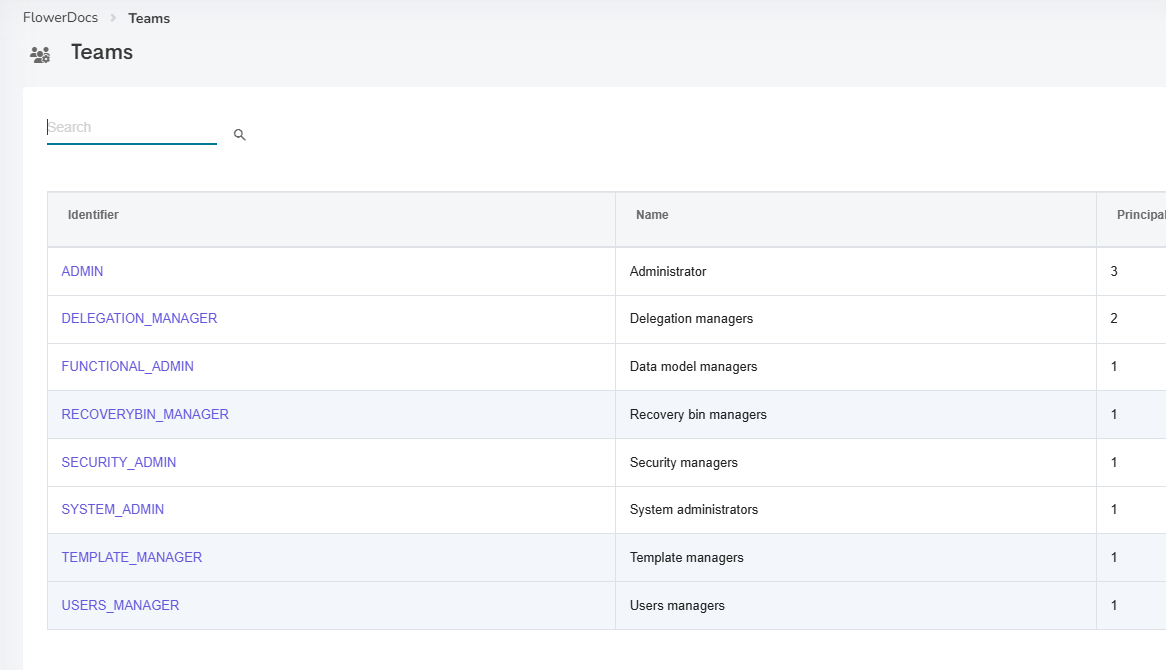
FlowerDocs 2026.2.0 introduces six administrative roles that make it possible to delegate part of the administration to business users without granting them full administrative rights. A business manager can thus handle delegations, the recovery bin or email templates on their own, without having to call on the technical team. These roles come in addition to the ADMIN and SYSTEM_ADMIN profiles, which keep full rights, and each one only gives access to the menus and actions it covers:
| Role | Label | What the role allows |
|---|---|---|
TEMPLATE_MANAGER | Template managers | Manage email templates (body and signatures) and stamps |
DELEGATION_MANAGER | Delegation managers | Create, edit and delete delegations for all users |
RECOVERYBIN_MANAGER | Recovery bin managers | Restore or permanently delete deleted documents, folders, virtual folders and tasks |
USERS_MANAGER | Users managers | Manage users, groups and business teams |
SECURITY_ADMIN | Security managers | Configure the directory and OAuth, manage users and groups |
FUNCTIONAL_ADMIN | Data model managers | Create and edit component classes, tags and ACLs, edit existing processes, manage email templates and stamps, without being able to delete any element of the data model |
Roles can be combined, and only an administrator can assign them. They are available by default in new scopes, and integrators can add them to existing scopes. For more information, see the administration roles documentation.
💻 New search operators
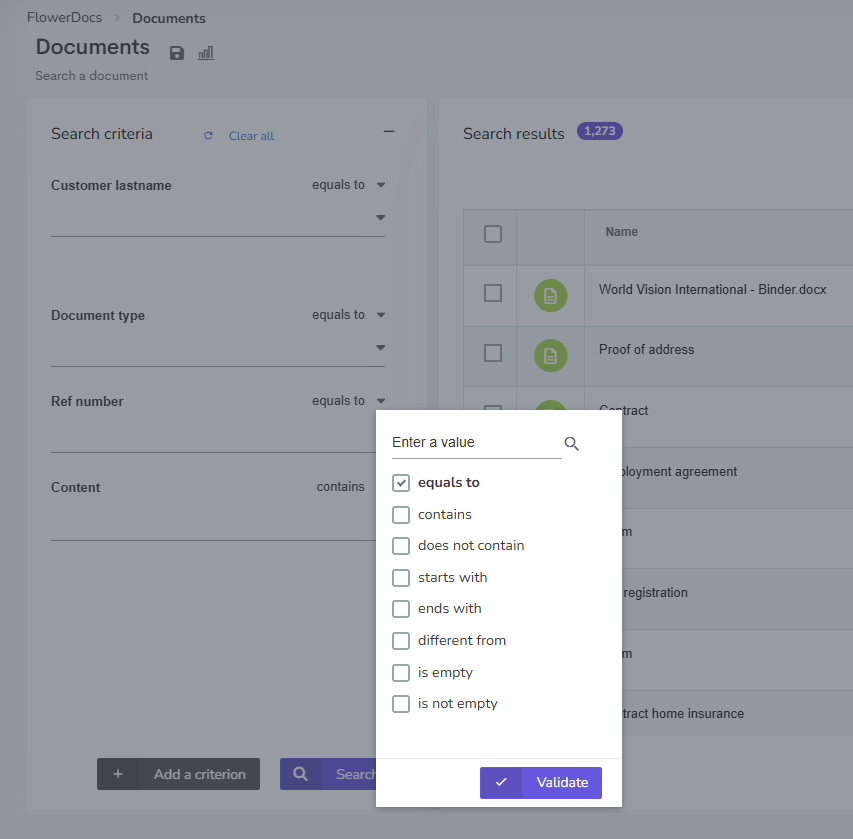
Three new search operators, "does not contain", "is empty" and "is not empty", make searching simpler and data quality easier to check.
Until now, excluding a word from a search meant listing every expected value. The "does not contain" operator now directly excludes the documents, folders and tasks whose text field contains that word.
The "is empty" and "is not empty" operators, available on text, list, date and numeric tags, meet another need: finding items where a field has not been filled in, for example after an optional tag has become mandatory or after a data migration.
These operators are also available on the Content criterion, where "is empty" finds, for example, documents with no indexed text.
Finally, the sentence "X results have been found in Y ms" no longer appears below the results table, to free up space on screen.
💻 Content search: the value is searched as typed
Content search becomes more precise: the value entered is now searched exactly as it is written, punctuation included. An email address, a date such as 09/06/2017 or a percentage such as 20% is therefore found in the text of documents, including from the quick search.
This change affects the use of quotation marks. Until now, they were used to search for an exact phrase, because the operator could not be selected on this criterion. This is now the role of the "equals to" operator, and quotation marks are searched like any other character. Searches that used quotation marks, including saved searches, therefore need to be adapted by selecting "equals to" and removing the quotation marks.
💻 ARender viewer update
The ARender viewer embedded in FlowerDocs has been updated to version 2026.3.1. This update improves everyday document display and handling:
- In the Document Builder, multiple page selection with Ctrl+click works again.
- Large-format pages are displayed faster.
- Word documents are rendered with a more faithful layout.
- Inline images in EML emails stay in the message body, and some MSG emails that could not be displayed now open.
- Copying text from a justified paragraph now keeps the spaces between words.
For more information, see the ARender release notes here
For integrators
💻 Administrative roles: API enforcement and setup
Administrative role restrictions are not limited to the interface: the API enforces them as well. Any call to an administration resource outside the user's scope is rejected with a 403 error. Integrations that rely on the status code returned by these rejections should be checked, as detailed in the upgrade notes.
The six roles are declared by default in new scopes. An existing scope keeps working with ADMIN alone; to use the new roles there, add their teams to the scope as described in the upgrade notes.
💻 Dedicated recovery bin search service
The recovery bin now has its own search service, POST /{category}/recoverybin/search, available to the ADMIN, SYSTEM_ADMIN and RECOVERYBIN_MANAGER profiles. Integrations that listed the recovery bin with the generic search must now use it.
👨💻 New JavaScript API methods
The JavaScript API has been extended so that the most common customizations no longer require overriding product scripts, and therefore remain compatible with version upgrades.
The contextual menu is a good example of this change. Until now, hiding or adding an action required overriding the entire registerToAddAnswersInTaskContextualMenu script, at the risk of no longer benefiting from product improvements. With the new ContextualMenuAPI.registerForActionDisplayResolution method, integrators can now simply declare the actions to hide or add, without modifying the product script. Existing customizations keep working, but adapting them to this method ensures they continue to benefit from product improvements in future upgrades. For more information, see the contextual menu documentation.
Task answers follow the same principle. The TaskJsAPI.registerBeforeAnswer and registerAfterAnswer methods make it possible to react to all answers, not only those with a reason, for example to adapt the interface once the answer has been applied. For more information, see the task answers documentation.
Finally, the search popup now supports selecting several documents with buildSearchToSelectMultiple. The Popup.buildSearch method has been deprecated in favor of buildSearchToSelectUnique. For more information, see the search popup documentation.
💻 New search operators and content search
The new operators are also available in the API: "does not contain" (NOT_CONTAINS) on text tags, and "is empty" and "is not empty" (EMPTY, NOT_EMPTY) on text, list, date and numeric tags. All three are also accepted on the Content criterion.
Similarly, API calls that wrapped the Content criterion value in quotation marks to get an exact phrase must now use the EQUALS_TO operator, without quotation marks.
💻 ACL rules on user authorities
The faster searches for users who belong to many groups come from a change in how ACL rules are evaluated. A CONTAINS condition on ${user.authorities} or ${user.id} now compares the exact value, rather than part of the value. A rule that relied on a partial match therefore grants fewer rights than before and should be checked.
For operators
💻 Security
This version includes several security fixes and additional protective measures, as well as fixes for vulnerabilities identified in third-party dependencies (CVEs).
💻 ARender update: security
The update to ARender 2026.3.1 brings its own security fixes as well as third-party dependency updates.
For more information, see the ARender release notes here
Bug fixes
| Bug | Ticket |
|---|---|
| Users | |
| Dates — When a date is typed manually in a date field (indexing form or search criterion), the date picker now moves to the correct date, month and day included. | FD-17986 / FD-18684 / TMAFLW-1173 / TMAFLW-1246 |
| Tasks — Assigning a task to the user it is already assigned to no longer causes an error, including during mass assignment. | FD-18476 / TMAFLW-1352 |
| Tasks — The actions offered in the contextual menu and the toolbar remain consistent when several tasks are selected quickly. | FD-14946 / TMAFLW-1032 |
| Search — The operator applied to a criterion is now checked when the user opens the operator list. | FD-16675 |
| Search — The number of results per page chosen in a virtual folder is kept when returning to the list after opening a result. | FD-14777 |
| Search — Searches run by users who belong to a large number of groups are significantly faster. | FD-17894 / TMAFLW-1143 |
| Viewer — Highlighting of the searched word in the content now works from the first document opened, including with "Open in a new window". | FD-17731 / TMAFLW-1219 |
| Favorites — Adding a favorite no longer generates an error in the browser console. | FD-18594 / TMAFLW-1278 |
| Integrators | |
| Administration — Changes made in the administration screens that contain code (scripts, CSS, GUI configurations, stamps, email templates, script operation handlers) are saved again. | FD-18671 / TMAPR-7072 |
| Administration — The "starts with" and "ends with" operators set on the class criterion of a search are now correctly displayed in the administration and are no longer replaced by "equals to" when saving. | FD-17488 / TMAFLW-918 |
| Swagger — The examples of the authentication and token generation services now show the date format actually returned. | FD-18576 / TMAFLW-1356 |
Known issues
- Administrative roles — When opening the administration, users whose role does not give access to the Scope tab wrongly receive a notification about missing permissions, although the screen opens normally.
- Administrative roles — Users with the
SYSTEM_ADMINrole cannot delete an email body or signature template. - Search for documents to attach — When selecting documents across several result pages, the selection of a page already visited is not kept when returning to it: the checkboxes appear unchecked. The selection is correctly taken into account as long as the user does not return to a page already viewed.
FlowerDocs eProcess
For users
💻 Attach several existing documents at once
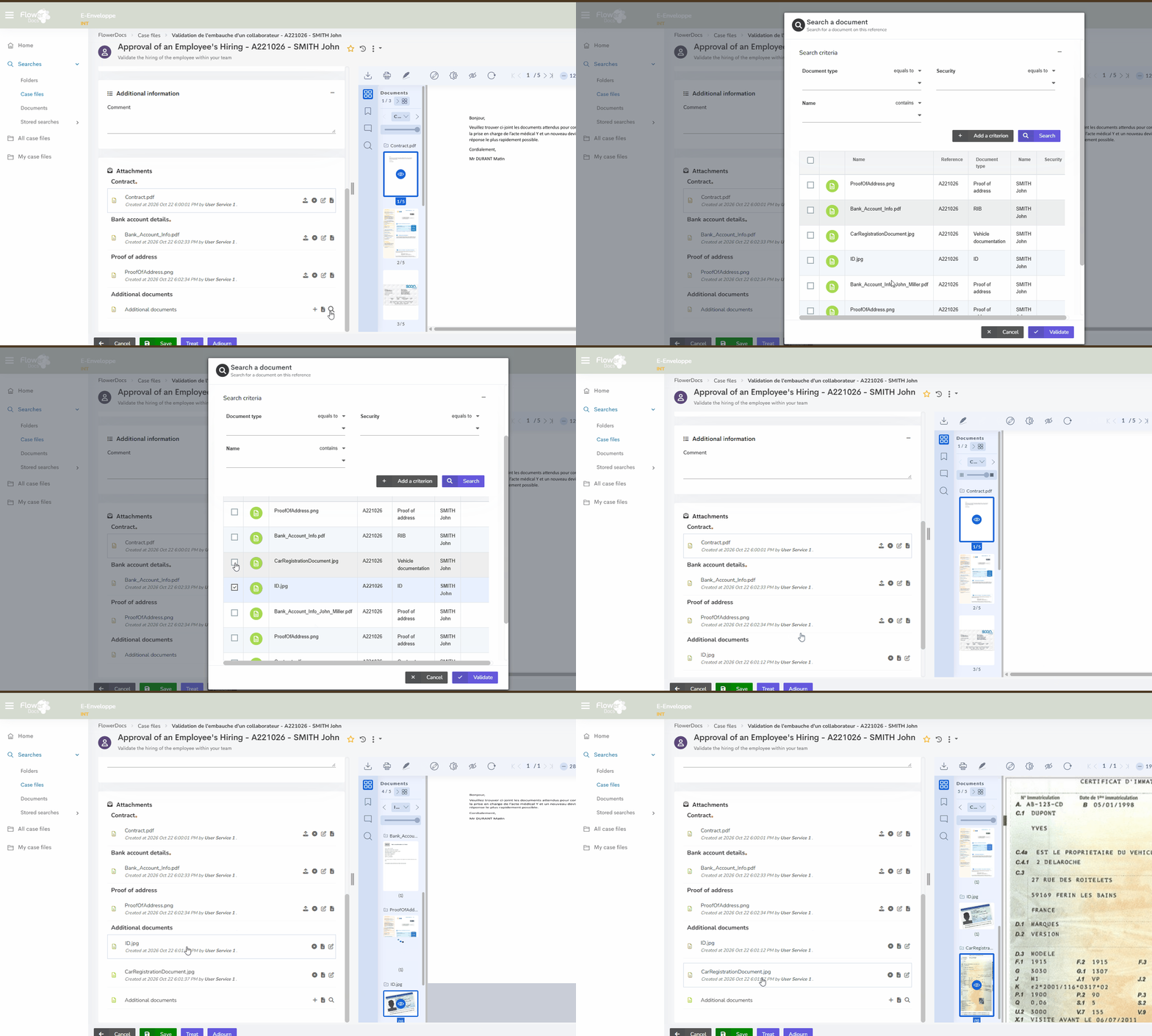
When processing a step, attaching several existing documents used to require repeating the search and the attachment for each of them. When the attachment accepts several documents, the magnifying glass now opens a multi-selection search: users check the documents they need, including across different result pages, and attach them in a single action.
💻 Clearer wording for English-speaking users
With an English browser, eProcess now uses the term "case file" instead of "envelope", which is clearer for English-speaking users. This wording applies throughout the solution: menus (All case files, My case files), search, case file creation, status and tooltips in the process administration wizard. The child case file creation popup is also now translated into French and English, and the French labels remain unchanged.
For integrators
No specific changes have been made to eProcess. This version benefits from all the changes and fixes made to FlowerDocs for integrators.
For operators
No specific changes have been made to eProcess. This version benefits from all the changes and fixes made to FlowerDocs for operators.
Bug fixes
No eProcess-specific fixes in this version.
Known issues
No known issues specific to eProcess for this version.
FlowerDocs GEC
For users
💻 Mail stays open after resuming processing
When a user resumes processing of a pending mail, the mail now stays open. Its status changes to "In progress" and it remains assigned to the user, who can carry on working without having to search for it again.
For integrators
No specific changes have been made to GEC. This version benefits from all the changes and fixes made to FlowerDocs for integrators.
For operators
No specific changes have been made to GEC. This version benefits from all the changes and fixes made to FlowerDocs for operators.
Bug fixes
No GEC-specific fixes in this version.
Known issues
No known issues specific to GEC for this version.