ARender v2026.3.0 - Release Notes
ARender 2026.3.0 is the third minor release on the 2026 line. ARender Horizon gains an Excel data view that displays .xlsx spreadsheets as a grid in the browser, a public JavaScript API so a host application can read, navigate, search, download and annotate the open document, and three new annotation tools: arrow, freehand and strikethrough. On the backend, redaction now also removes vector graphics and form fields under the redacted area, the PDF engine is upgraded to fix slow rendering of large-format pages, and a series of email, conversion and memory fixes land together with security hardening.
As in the previous releases, the changes below are grouped by viewer: a shared Security section, then ARender Horizon (React), ARender Classic (GWT), and finally Rendition for backend, conversion and integration changes that apply to both viewers.
See the v2026.3.0 upgrade notes for step-by-step migration instructions.
Security
Applies to the whole platform (both viewers).
Security fixes and dependency updates
Changed - This release includes security hardening across the platform together with updates to third-party dependencies and container base images to address known vulnerabilities. For details on the specific issues addressed, please contact ARender support.
ARender Horizon (React)
Changes specific to the React viewer (ARender Horizon).
New features and improvements
Public JavaScript API
New - ARender Horizon now exposes a JavaScript API on window.ARender and on the <arender-element> Web Component, so a host application can drive the viewer without touching its internals. The API covers:
- Reading the open document - current and root document ids, document layout and metadata.
- Navigation - go to a page or a document, next and previous document.
- Search - start a search and step through the results.
- Download - download the open document or the whole set.
- Annotations - create, update, delete, list and refresh annotations.
- Events - subscribe to page and document changes, load failures, first page displayed, and annotation creation, update, deletion and write failures.
Every call returns typed results and documented error codes, and TypeScript definitions ship with the package. This API is new and does not reproduce the Classic JavaScript API: integrations moving from Classic rewrite their calls against it. See the JavaScript API reference for every call, event and error code.
Excel data view
New - .xlsx spreadsheets now open in a Data view: the workbook is shown as a grid, rendered directly by the browser. It has one tab per sheet, a sheet list in the side panel and a formula bar, and it keeps the workbook formatting (colors, borders, merged cells, number formats). The data is displayed before the PDF conversion of the file is complete, so large spreadsheets are readable in seconds instead of scrolling through thousands of converted pages.
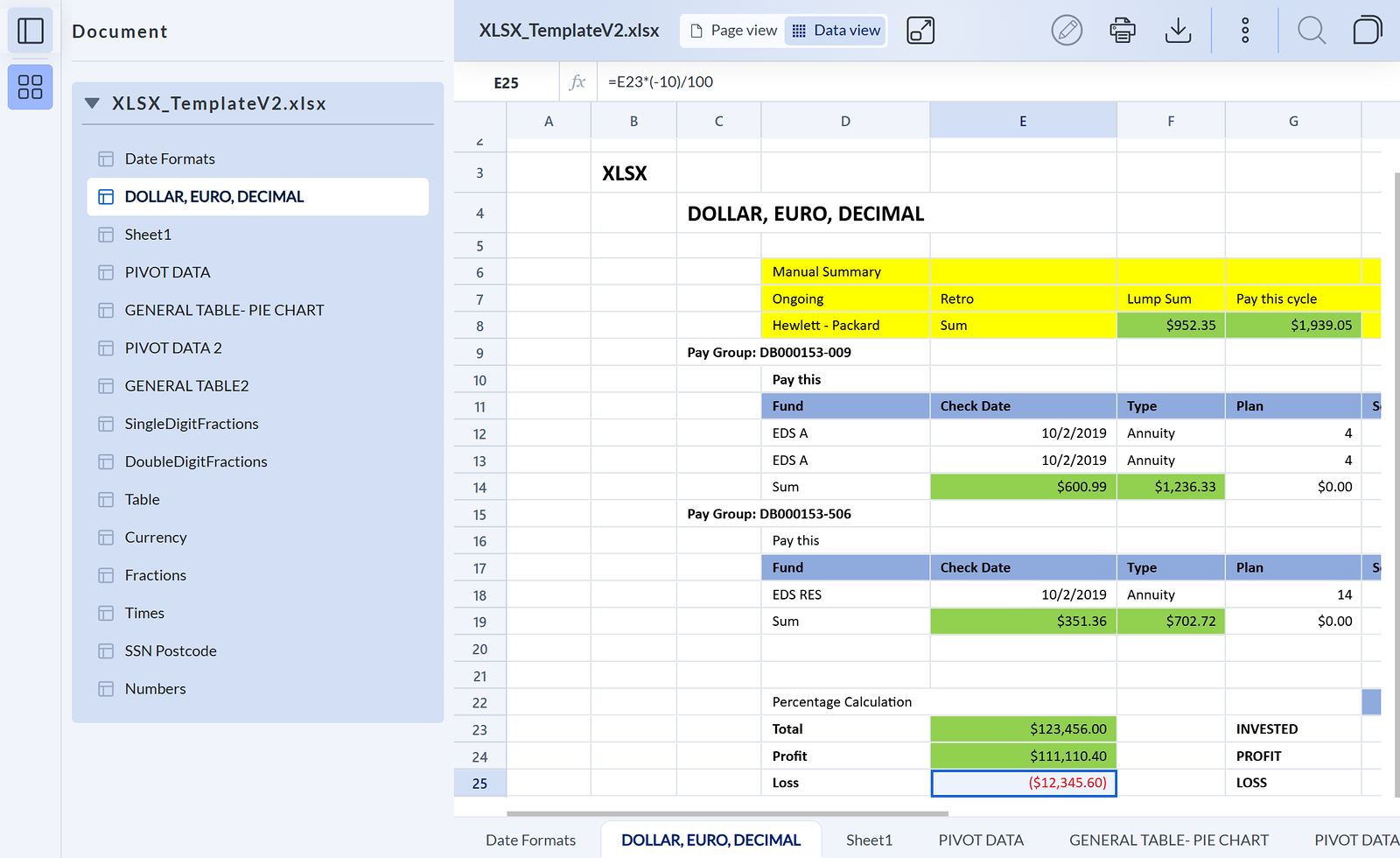
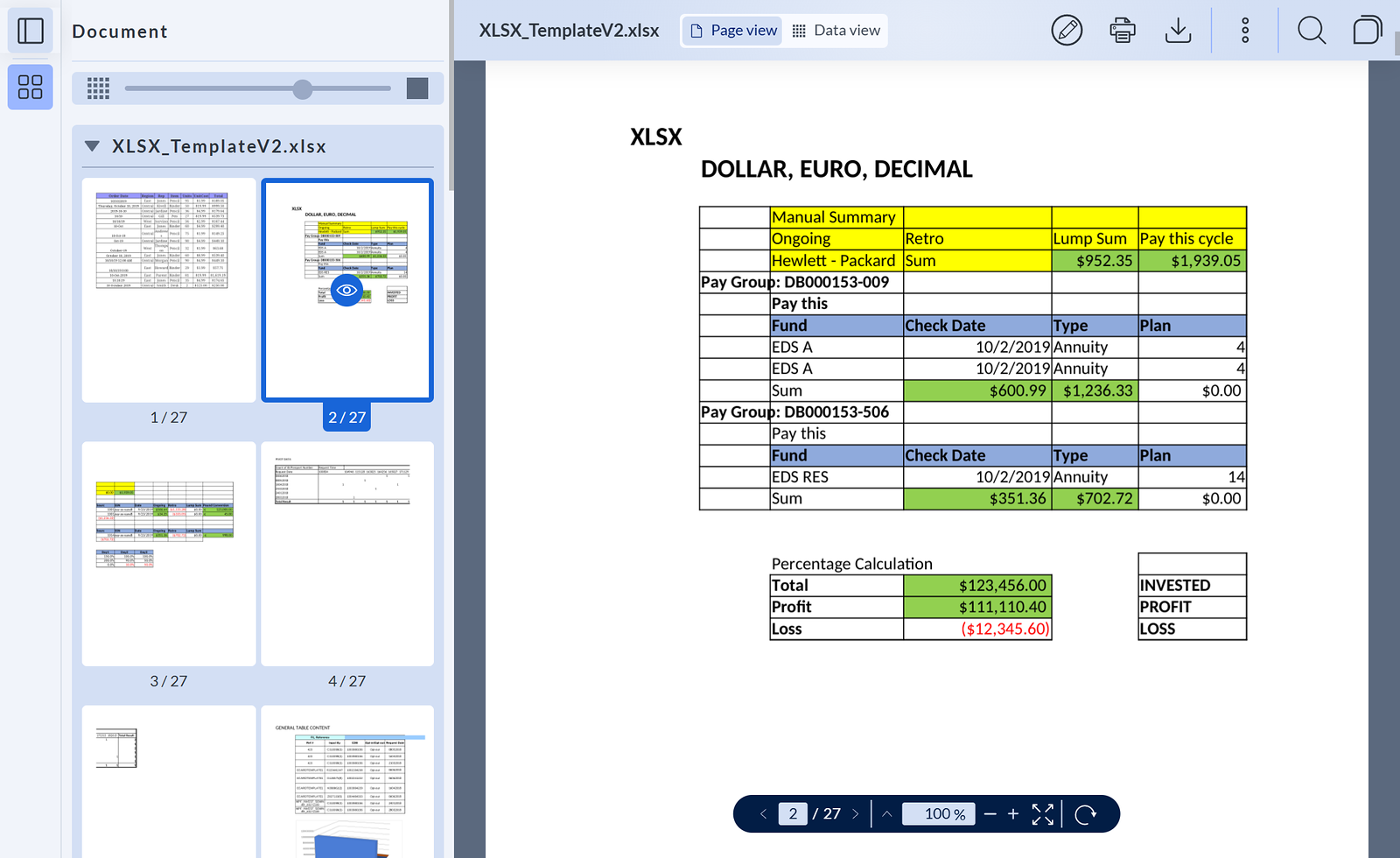
The Data view is for viewing only. The PDF conversion of the spreadsheet still runs in the background while the Data view is displayed, so the Page view, the converted PDF pages that ARender displayed until now, remains available from the view switcher. Search and annotations work in the Page view only: in the Data view, their buttons are disabled and point to the switcher. Other spreadsheet formats (.xls, .xlsb, .csv) open in the Page view as before.
Arrow annotations
New - An arrow annotation tool is now available in the Horizon annotation menu, to point at a detail of the page. Arrows can be drawn, moved and deleted. Arrows created in ARender Classic are now displayed in Horizon as well.
Freehand annotations
New - Users can now draw freehand directly on the document from the annotation menu. Freehand (ink) annotations created in ARender Classic are now displayed in Horizon as well.
Strikethrough annotations
New - Selected text can now be struck through from the text-selection menu, with a choice of color. It completes the highlight and underline tools added in the previous releases.
Fewer server calls when editing a free text annotation
Changed - Editing a free text annotation no longer sends redundant requests to the server.
Bug fixes
The viewer keeps your page
Fixed - The viewer no longer loses the current page when zooming (including going back to 100%), opening or closing the side panel, switching to fullscreen or resizing the window. Zooming out now applies to the page being read, the zoom is reset when a new document is opened, and a document opened through the JavaScript API is displayed at a normal zoom level instead of zoomed out.
Free text annotations: delete button and cursor keys
Fixed - Free text annotations now show a delete button like the other annotation types, and the left and right arrow keys move the cursor while editing the text.
Double-click on an annotated word
Fixed - Double-clicking a highlighted or underlined word opens the text-selection menu again, instead of the annotation edit menu.
Underline on large or bold text
Fixed - An underline on large or bold text no longer overlaps the next line.
Comments of documents not yet opened
Fixed - When a set contains several documents, the comments panel lists the comments of every document on first opening, including the documents not displayed yet.
Deleting a comment deletes its replies
Fixed - Deleting a comment now also deletes its replies, instead of leaving them orphaned.
Annotation markers on thumbnails
Fixed - Thumbnails now mark the pages that carry annotations.
Top panel while switching documents
Fixed - While the next document loads, the top panel no longer shows the title and actions of the previous document.
Same document twice in a set
Fixed - A set that contains the same document twice now handles each occurrence separately.
Rendition URL in the Docker image
Fixed - The Horizon Docker image and the development proxy now point to the correct Rendition endpoint by default.
ARender Classic (GWT)
Changes specific to the Classic (GWT) viewer and its connectors.
New features and improvements
Faster document opening from FileNet
Changed - The FileNet connector makes fewer calls to the Content Engine when opening a document, so documents open faster.
Developer notes
SOAP binding removed from the CMIS / Alfresco connector
Removed - The CMIS and Alfresco connector no longer ships the SOAP (Web Services) binding, which was not functional on the current platform. Only the AtomPub binding remains. The arender.server.alfresco.use.soap.ws and arender.server.alfresco.soap.ws.url properties no longer have any effect.
Bug fixes
Ctrl+click in the Document Builder
Fixed - In the Document Builder, Ctrl+click multi-selection of pages works again (regression since 2023.19.0).
FileNet retrieval name after a merge or split
Fixed - After a merge or split in the Document Builder, the FileNet RetrievalName property is updated again when the script sets the document title.
Circle and rectangle colors
Fixed - When the annotation style is remembered, circles keep their fill color and rectangles keep their border color for the next annotation.
Session cookie with Hazelcast sessions
Fixed - With Hazelcast sessions enabled (the default), the viewer now sets only the SESSION cookie, without an extra JSESSIONID cookie.
Blank pages with the document availability check enabled
Fixed - With the document availability check enabled (arender.server.rendition.disable.check.document.availability=false), documents no longer stay on the loading spinner or display blank pages: page requests are now attached to the session that opened the document.
Video playback in Safari
Fixed - Videos larger than 8 MB now play in Safari: large range requests are served in chunks instead of failing.
Document statistics under load
Fixed - Document statistics (as shown in the "About ARender" panel) are no longer corrupted when several users load documents at the same time.
Rendition
Backend, conversion and integration changes that apply regardless of the viewer.
New features and improvements
PDF engine upgrade
Changed - The PDFOwl rendering engine is upgraded to 1.24-33. It fixes the slow rendering of large-format pages introduced with the previous engine version.
Word documents with DirectOffice
Changed - The DirectOffice engine is upgraded, improving layout fidelity (text alignment) of Word documents.
Redaction removes vector graphics and form fields
Changed - A redaction now also removes the vector graphics (logos, drawn signatures, line art) and the interactive form fields located under the redacted area in the published document. Ink, free text and text-markup annotations under the redacted area are cut accordingly.
Developer notes
PDFOwl memory limit
Changed - pdfowl.memlimit.mb is now applied when each PDFOwl process starts. Its default changes from 1024 to unset, which lets PDFOwl apply its own default; values above 2047 are capped to 2047 with a warning. A new property, pdfowl.client.max-idle (default 16), sets the maximum number of idle PDFOwl processes kept for reuse. Deployments that relied on the previous 1024 MB default should set the property explicitly.
Document layout API
Changed - In the document layout returned by the Rendition API, each child of a composite document (ZIP archive, email attachment) now carries its MIME type.
Annotation API responses
Fixed - Creating or updating an annotation through the Rendition annotation API now returns the stored annotation, with its correct position and document id.
.xlsb support in the format lists
Changed - The .xlsb MIME type (application/vnd.ms-excel.sheet.binary.macroEnabled.12) is added to the Excel conversion lists. Deployments that override mime.type.msoffice.excel or arender.format.conversionTargetMimeTypes.application-pdf must add it to their own lists.
Bug fixes
.xlsb downloads
Fixed - A downloaded .xlsb file keeps its .xlsb extension, and .xlsb files are converted like the other Excel formats.
Email conversion
Fixed - Several email conversion issues are fixed: inline images of EML emails stay in the body instead of appearing as separate attachment pages, emails embedding a vector image no longer raise a false "format not supported" alert, and some MSG emails that failed to render now open.
Copy and paste from justified text
Fixed - Copying text from a justified PDF paragraph now keeps the spaces between words.
Memory leak with signature verification
Fixed - With signature verification enabled, viewing signed PDFs no longer builds up memory until the service freezes.
Orphaned LibreOffice processes on Windows
Fixed - On Windows, leftover LibreOffice processes are cleaned up when the conversion service starts or restarts, which ends a crash loop after a restart.
Changelog
| Summary | Viewer | Type | Key | Linked Issues |
|---|---|---|---|---|
| Security hardening | Both | Security | AR-18690 | TMAPR-7005 |
| Dependency security update | Both | Security | AR-18637 | |
| Dependency security update | Both | Security | AR-18655 | |
| Dependency security update | Both | Security | AR-18699 | |
| Dependency security update | Both | Security | AR-18702 | |
| Dependency security update | Both | Security | AR-18703 | |
| Dependency security update | Horizon | Security | AR-18745 | |
| Dependency security update | Both | Security | AR-18747 | |
| Dependency security update | Both | Security | AR-18778 | |
| Dependency security update | Both | Security | AR-18783 | |
| Dependency security update | Horizon | Security | AR-18787 | |
| Dependency security update | Both | Security | AR-18788 | |
| Dependency security update | Horizon | Security | AR-18789 | |
| Dependency security update | Horizon | Security | AR-18790 | |
| Dependency update of the MIME detection library | Both | Evolution | AR-18609 | |
| JavaScript API: shape and call style | Horizon | New feature | AR-18626 | |
| JavaScript API: reading the open document | Horizon | New feature | AR-18612 | |
| JavaScript API: going to a page or a document | Horizon | New feature | AR-18614 | |
| JavaScript API: viewer events | Horizon | New feature | AR-18615 | |
| JavaScript API: download commands | Horizon | New feature | AR-18621 | |
| JavaScript API: search commands | Horizon | New feature | AR-18622 | |
| JavaScript API: annotation commands and events | Horizon | New feature | AR-18625 | |
| Excel data view: early data display and prefetch | Horizon | New feature | AR-18524 | |
| Excel data view: sheet list and thumbnails in the side panel | Horizon | New feature | AR-18562 | |
| Excel data view: side panel navigation in the Data view | Horizon | New feature | AR-18620 | |
| Arrow annotation | Horizon | New feature | AR-17768 | |
| Freehand annotation | Horizon | New feature | AR-18586 | |
| Strikethrough annotation | Horizon | New feature | AR-18451 | |
| Free text annotations trigger redundant server calls | Horizon | Evolution | AR-18583 | |
| Viewer loses its page on zoom, side panel, fullscreen, resize and document change | Horizon | Bug fix | AR-18706 | |
| Zoom out applies to the wrong page after maximum zoom in | Horizon | Bug fix | AR-17816 | |
| Zoom level is kept when loading a new document | Horizon | Bug fix | AR-17865 | |
| Document appears zoomed out after opening through the JavaScript API | Horizon | Bug fix | AR-18447 | |
| Free text annotation missing a delete button | Horizon | Bug fix | AR-18572 | |
| Arrow keys do not move the cursor in free text edit mode | Horizon | Bug fix | AR-18581 | |
| Double-click on an annotated word opens the annotation edit menu | Horizon | Bug fix | AR-18564 | |
| Underline on bold text overlaps the next line | Horizon | Bug fix | AR-18553 | |
| Comments of documents not yet opened are missing from the panel | Horizon | Bug fix | AR-18507 | |
| Deleting a comment does not delete its replies | Horizon | Bug fix | AR-18685 | |
| Thumbnails do not mark annotated pages | Horizon | Bug fix | AR-18664 | |
| Top panel shows the previous document while the next one loads | Horizon | Bug fix | AR-18654 | |
| Same document twice in a set is not handled separately | Horizon | Bug fix | AR-18633 | |
| Wrong default Rendition URL in the Docker image and dev proxy | Horizon | Bug fix | AR-18597 | |
| Faster document fetching in the FileNet connector | Classic | Evolution | AR-18519 | |
| Ctrl+click does not work in the Document Builder | Classic | Regression | AR-18352 | TMAPR-6830 |
| FileNet RetrievalName not updated after merge or split | Classic | Regression | AR-18566 | TMAPR-6936 |
| Circle and rectangle lose their customized color | Classic | Bug fix | AR-18634 | TMAPR-6956 |
| Extra JSESSIONID cookie created alongside the Hazelcast session cookie | Classic | Bug fix | AR-18556 | |
| Blank pages when the document availability check is enabled | Classic | Bug fix | AR-18441 | TMAPR-6651 |
| Video playback fails in Safari for files larger than 8 MB | Classic | Bug fix | AR-18574 | TMAPR-6876 |
| Document statistics corrupted under concurrent load | Classic | Bug fix | AR-18568 | TMAPR-6952 |
| Slow rendering of large-format pages | Both | Regression | AR-18599 | TMAPR-6913 |
| PDFOwl engine upgraded to 1.24-33 | Both | Evolution | AR-18721 | |
| Alignment issues in Word documents with DirectOffice | Both | Bug fix | AR-18584 | TMAPR-6904 |
| Redaction leaves vector content in the exported PDF | Both | Bug fix | AR-18577 | |
| Redaction does not remove interactive form fields | Both | Bug fix | AR-18635 | TMAPR-6975 |
| Annotation API returns a wrong position and no document id | Both | Regression | AR-18680 | |
| MIME type of composite document children in the layout | Both | Evolution | AR-18682 | |
| Wrong file extension when downloading an .xlsb document | Both | Bug fix | AR-18607 | |
| Inline images in EML emails shown as attachments | Both | Bug fix | AR-18675 | TMAPR-6995 |
| False unsupported-format alert for an email vector image | Both | Bug fix | AR-18660 | TMAPR-6790 |
| MSG email fails to render | Both | Bug fix | AR-18585 | TMAPR-6935 |
| Copy and paste from justified PDF text loses spaces | Both | Bug fix | AR-18642 | TMAPR-6798 |
| Memory leak in signature verification causes freezes | Both | Bug fix | AR-18580 | TMAPR-6933 |
| Orphaned LibreOffice processes cause a crash loop on Windows | Both | Bug fix | AR-18308 | TMAPR-6783 |