Track migration state in a side database (the migration ledger)
One small SQL table, outside the source and outside the target, holding one row per document with its status. Fast2 reads its work queue from it and writes each outcome back, so "which punnets do I re-run?" becomes a SELECT.
Four columns, four statements, no custom module. If you can write an UPDATE, you can implement this.
This page is the implementation. The reasoning — when a ledger is worth it, when it is over-engineering, and why it must stay small — is in the Playbook: The Migration Ledger →.
Prerequisites
- A SQL database instance that is neither the source's nor the target's. Any Postgres or SQL Server will do; it holds a few hundred million tiny rows at most.
- The matching JDBC driver in
FAST2_HOME/Worker-libs/, and one configuredSQLQueryGenericCallershared by all three SQL tasks below (see Interact with a SQL database for the connection URL and the encrypted-password fields).
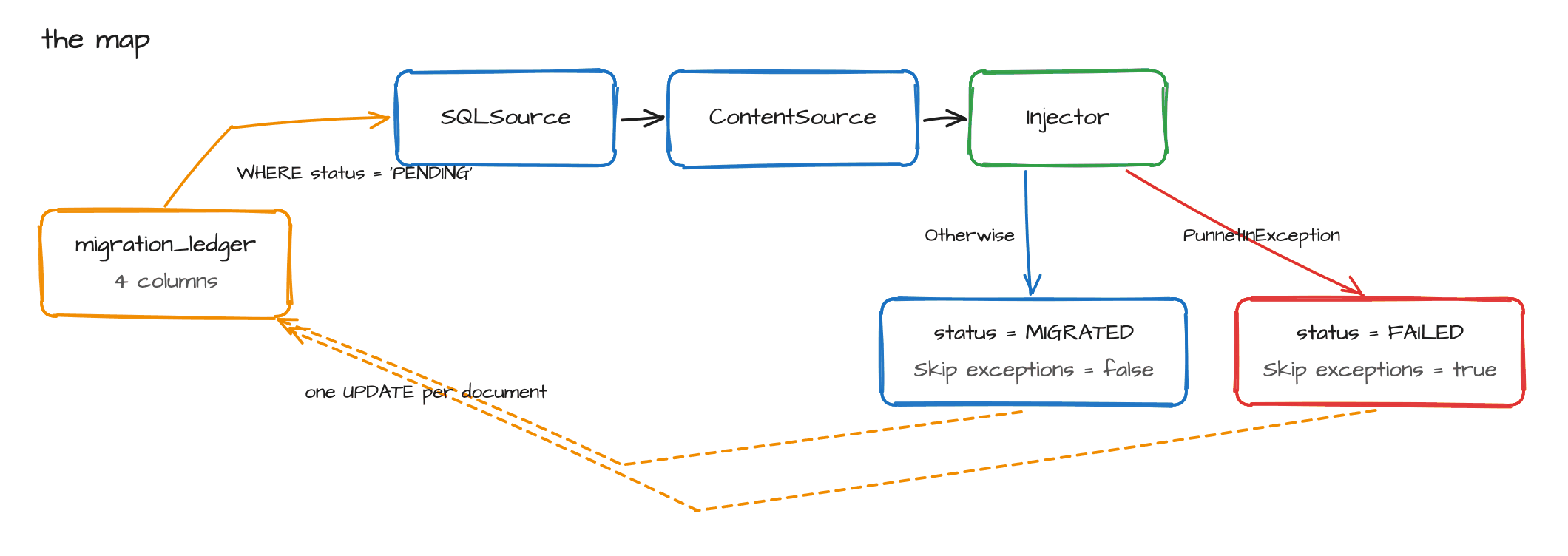
1. The table
CREATE TABLE migration_ledger (
    source_id  VARCHAR(255) NOT NULL PRIMARY KEY,
    status     VARCHAR(16)  NOT NULL DEFAULT 'PENDING',
    batch_id   VARCHAR(64),
    updated_at TIMESTAMP
);

CREATE INDEX ix_ledger_status ON migration_ledger (status);
This table takes one UPDATE per migrated document, so every extra index is write amplification on the hot path of your migration. One index on status is what the queries below need. No triggers, no views, no stored procedures, no partitioning.
2. Populate it once
Run this before any content moves, against the metadata dump rather than the live source. It is a projection of two columns with no blobs, so it is cheap.
-- Example: a FileNet-style metadata dump in the staging zone
INSERT INTO migration_ledger (source_id, batch_id)
SELECT d.doc_guid, 'INVENTORY-2026-Q1'
FROM   staging_docversion d
WHERE  d.retired = 0;
You now have a denominator, which is what makes every percentage real:
SELECT status, COUNT(*) FROM migration_ledger GROUP BY status;
3. Read the work queue (the source)
Configure a SQLSource:
| Setting | Value |
|---|---|
| SQL connection provider | your SQLQueryGenericCaller |
| SQL query | SELECT source_id FROM migration_ledger WHERE status = 'PENDING' |
| SQL mapping for punnet | source_id → punnetId |
| SQL mapping for document | source_id → documentId |
Mapping source_id onto punnetId keeps Fast2's own trace IDs aligned with your rows, so a Kibana trace and a ledger row carry the same identifier.
Two campaigns running this query at the same time will pick up the same documents. The injector's duplicate prevention absorbs the second write, but you have already paid for the source read twice.
The fix is a rule, not a lock: one campaign against the ledger at a time, or give each campaign its own batch and add AND batch_id = 'INVENTORY-2026-Q1' to the query above.
Downstream, ContentSource fetches the bytes exactly as it did before — the ledger replaces the scan, never the content path.
4. Mark migrated (success link, after the injector)
A SQLStatementTask on the injector's success output:
| Setting | Value |
|---|---|
| Query caller | your SQLQueryGenericCaller |
| Skip exceptions | false |
| SQL statement | see below |
UPDATE migration_ledger
SET    status = 'MIGRATED', updated_at = CURRENT_TIMESTAMP
WHERE  source_id = '${documentId}';
Skip exceptions off on this one taskThis is the one place in the pipeline where swallowing an exception is actively harmful. If the injector succeeds and this UPDATE fails silently, the row stays PENDING and the document is re-migrated on every subsequent pass — forever, and invisibly.
Skip exceptions is permissive by default on Fast2's SQL tasks. Set it explicitly here.
5. Mark failed (exception link)
Add a second output link from the injector carrying the PunnetInException link condition, leading to another SQLStatementTask:
UPDATE migration_ledger
SET    status = 'FAILED', updated_at = CURRENT_TIMESTAMP
WHERE  source_id = '${documentId}';
Set Skip exceptions to true here only — a failure to record a failure must not abort the campaign. Pair it with a CSVWriter on the same link if you want a file an engineer can open directly.
6. The queries you will actually run
Which batches still need work — the original question:
SELECT batch_id, COUNT(*) AS not_landed
FROM   migration_ledger
WHERE  status <> 'MIGRATED'
GROUP  BY batch_id
ORDER  BY not_landed DESC;
Put the failures back in the queue, after you have fixed whatever caused them:
UPDATE migration_ledger SET status = 'PENDING' WHERE status = 'FAILED';
Top the inventory up during the delta phase, so PENDING = 0 does not quietly mean "done with the inventory as it stood in February":
INSERT INTO migration_ledger (source_id, batch_id)
SELECT d.doc_guid, 'DELTA-2026-06-14'
FROM   staging_delta d
WHERE  NOT EXISTS (SELECT 1 FROM migration_ledger m WHERE m.source_id = d.doc_guid);
The NOT EXISTS guard makes the top-up idempotent, so re-running the delta pass costs nothing.
Only if you need it
Do not start here. Add one column when a real question demands it:
| Column | Add it when |
|---|---|
attempt_count | transient failures start looping and you need to stop retrying a document after N tries |
target_id | reconciliation, or a support ticket, needs to walk from a source document to what it produced |
last_error | triage has become a human reading worker logs. A short label, not a stack trace |
doc_class | sign-off thresholds are per business class, which on a regulated estate they will be |
Checklist
- The ledger is on its own database instance — not the source's, not the target's.
- One index, on
status. -
Skip exceptions = falseon the mark-migrated task,trueon the mark-failed task. - The injector's duplicate-prevention boolean is set explicitly — it is the backstop that makes every re-run safe.
- One campaign against the ledger at a time, or one
batch_idper campaign. - Sign-off reconciles source inventory ↔ ledger ↔ an independent target count. The ledger is a first-party record and certifies nothing on its own — see what the ledger is not.