Custom connector development
For an overview of what a connector is, see Connectors concept. For the list of built-in connectors, see the integration catalog.
This guide explains how to build a custom connector JAR that integrates ARender with a document source not covered by the built-in connectors. A connector consists of two components: a URL parser that extracts request parameters, and a document accessor that provides the document content.
When to build a custom connector
Build a custom connector when your document source is not covered by the built-in connectors. Typical cases include in-house document repositories, proprietary ECM systems, or third-party APIs without an existing integration.
Architecture
A connector is deployed inside the ARender WEB-UI (N3). It bridges the browser request to your ECM backend (N4) and returns the document to the ARender Rendition engine (N5).
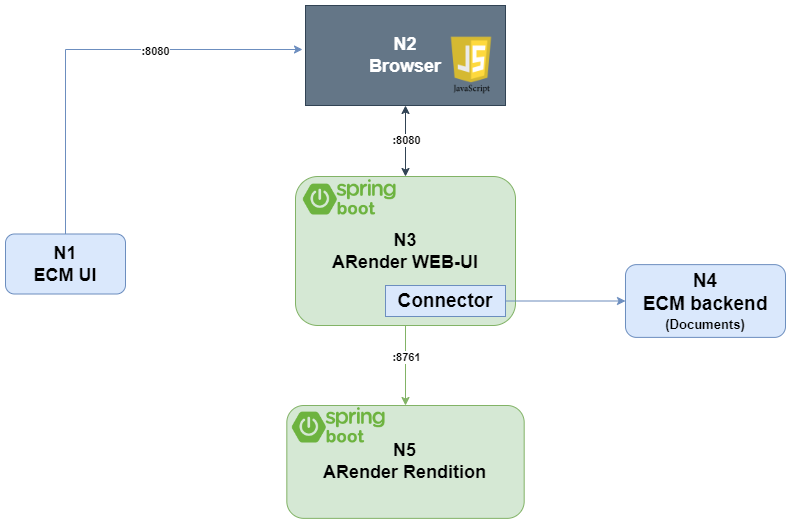
| Node | Role |
|---|---|
| N1: ECM UI | Lets the user select which document to open in ARender |
| N2: Browser | Opens the ARender frame using the URL provided by N1 |
| N3: ARender WEB-UI | Spring Boot module that hosts the connector |
| N4: ECM Backend | API the connector calls to fetch documents, annotations, and metadata |
| N5: ARender Rendition | Spring Boot module that generates images and extracts text |
Prerequisites
- Java 25+ and Maven for building the connector JAR
- ARender rendition API (
arondor-arender-rendition-api) as a dependency - Basic familiarity with Spring bean configuration (XML or auto-configuration)
How the URL parser chain works
When a user opens a document in ARender, the viewer's ServletDocumentService iterates over a chain of DocumentServiceURLParser beans. Each parser inspects the incoming HTTP request and decides whether it can handle the URL parameters. The first parser that returns true from canParse() is used to load the document.
The parser creates a DocumentAccessor -- an object that provides the document's content stream, metadata, and optionally an AnnotationAccessor for annotation storage. The accessor is registered with the DocumentService, and the rendition engine takes over from there.
HTTP request --> URL parser chain --> matching parser --> DocumentAccessor --> DocumentService
Core interfaces
DocumentServiceURLParser
Located in com.arondor.viewer.rendition.api:
public interface DocumentServiceURLParser {
    boolean canParse(DocumentService documentService,
                     ServletContext application,
                     HttpServletRequest request);

    DocumentId parse(DocumentService documentService,
                     ServletContext application,
                     HttpServletRequest request)
            throws DocumentNotAvailableException,
                   DocumentFormatNotSupportedException;
}
canParse()inspects the HTTP request parameters and returnstrueif this parser handles them.parse()extracts parameters, creates aDocumentAccessor, registers it with theDocumentService, and returns aDocumentId.
DocumentAccessor
Located in com.arondor.viewer.rendition.api.document:
public interface DocumentAccessor extends Serializable {
    DocumentId getDocumentId();
    String getDocumentTitle();
    void setDocumentTitle(String documentTitle);
    InputStream getInputStream() throws IOException;
    byte[] toByteArray() throws IOException;
    String getPath() throws IOException;
    String getMimeType() throws IOException;
    AnnotationAccessor getAnnotationAccessor()
            throws AnnotationsNotSupportedException;
    void setAnnotationAccessor(AnnotationAccessor annotationAccessor)
            throws AnnotationsNotSupportedException;
    DocumentAccessor asSerializableDocumentAccessor() throws IOException;
    DocumentMetadata getDocumentMetadata();
}
At minimum, implement getInputStream(), getMimeType(), getDocumentId(), getDocumentTitle(), and setDocumentTitle().
Specialized accessor interfaces
Extend the base DocumentAccessor to add capabilities:
| Interface | Purpose |
|---|---|
DocumentAccessorHasFileName | Provide a download filename different from the document title |
DocumentAccessorHasContext | Provide the name of the UI profile property file to use (e.g., returns role-user for role-user.properties) |
DocumentAccessorHasUserRole | Expose user roles for role-based access control |
DocumentAccessorHasPartialContent | Support streaming / chunked loading |
DocumentAccessorHasUpdateContent | Allow document content modification |
Step-by-step implementation
1. Create a Maven project
Set up a Maven module with the ARender rendition API as a dependency. For a complete example, see the sample connector on GitHub.
<dependencies>
    <dependency>
        <groupId>com.arondor.arender</groupId>
        <artifactId>arondor-arender-rendition-api</artifactId>
        <version>${arender.version}</version>
        <scope>provided</scope>
    </dependency>
    <dependency>
        <groupId>com.arondor.arender</groupId>
        <artifactId>arondor-arender-hmi-server</artifactId>
        <version>${arender.version}</version>
        <scope>provided</scope>
    </dependency>
    <dependency>
        <groupId>com.arondor.arender</groupId>
        <artifactId>arondor-arender-common</artifactId>
        <version>${arender.version}</version>
        <scope>provided</scope>
    </dependency>
    <!-- Required for the annotation connector (SerializedAnnotationContent) -->
    <dependency>
        <groupId>com.arondor.arender</groupId>
        <artifactId>arondor-arender-xfdf-annotation</artifactId>
        <version>${arender.version}</version>
        <scope>provided</scope>
    </dependency>
    <dependency>
        <groupId>javax.servlet</groupId>
        <artifactId>javax.servlet-api</artifactId>
        <version>3.0.1</version>
        <scope>provided</scope>
    </dependency>
</dependencies>
Use provided scope because the HMI application already includes the API at runtime. Refer to the sample connector POM for a complete list of dependencies.
To access Arondor's Artifactory repository, add the following to your ~/.m2/settings.xml:
<servers>
  <server>
    <id>arondor</id>
    <username>YOUR_LOGIN</username>
    <password>YOUR_PASSWORD</password>
  </server>
</servers>

<profiles>
  <profile>
    <id>artifactory</id>
    <repositories>
      <repository>
        <snapshots />
        <id>arondor</id>
        <url>https://artifactory.arondor.cloud/artifactory/arondor-all/</url>
      </repository>
    </repositories>
    <pluginRepositories>
      <pluginRepository>
        <snapshots />
        <id>arondor</id>
        <url>https://artifactory.arondor.cloud/artifactory/arondor-all/</url>
      </pluginRepository>
    </pluginRepositories>
  </profile>
</profiles>

<activeProfiles>
  <activeProfile>artifactory</activeProfile>
</activeProfiles>
If you don't have repository credentials, contact us at arender-sales@arondor.com.
Package the connector as a fat JAR using the maven-assembly-plugin:
<plugin>
    <groupId>org.apache.maven.plugins</groupId>
    <artifactId>maven-assembly-plugin</artifactId>
    <configuration>
        <descriptorRefs>
            <descriptorRef>jar-with-dependencies</descriptorRef>
        </descriptorRefs>
    </configuration>
    <executions>
        <execution>
            <id>make-assembly</id>
            <phase>package</phase>
            <goals>
                <goal>single</goal>
            </goals>
        </execution>
    </executions>
</plugin>
2. Implement the DocumentAccessor
Create a class that implements DocumentAccessor. This example fetches a document from a hypothetical REST API:
package com.arondor.arender.sample.connector.documentaccessors;

import java.io.*;
import java.net.URL;

import com.arondor.viewer.annotation.exceptions.AnnotationsNotSupportedException;
import com.arondor.viewer.client.api.document.DocumentId;
import com.arondor.viewer.client.api.document.metadata.DocumentMetadata;
import com.arondor.viewer.rendition.api.annotation.AnnotationAccessor;
import com.arondor.viewer.rendition.api.document.BinaryDocumentAccessor;
import com.arondor.viewer.rendition.api.document.DocumentAccessor;
import org.apache.log4j.Logger;

public class SampleDocumentAccessor implements DocumentAccessor {

    private static final Logger LOGGER = Logger.getLogger(SampleDocumentAccessor.class);
    private static final long serialVersionUID = 1L;

    private final DocumentId documentId;
    private final String urlParameterValue;
    private String documentTitle;
    private AnnotationAccessor annotationAccessor;
    private final DocumentMetadata documentMetadata = new DocumentMetadata();

    public SampleDocumentAccessor(String urlParameterValue, DocumentId documentId) {
        this.documentId = documentId;
        this.urlParameterValue = urlParameterValue;
    }

    @Override
    public InputStream getInputStream() throws IOException {
        // TODO: replace by a call to your service to download the document
        String remoteDocument = "https://demo.arender.io/docs/demo/" + urlParameterValue;
        URL url = new URL(remoteDocument);
        return url.openStream();
    }

    @Override
    public String getMimeType() throws IOException {
        return null;
    }

    @Override
    public DocumentId getDocumentId() {
        return documentId;
    }

    public DocumentId getUUID() {
        return documentId;
    }

    @Override
    public String getDocumentTitle() {
        return urlParameterValue;
    }

    @Override
    public void setDocumentTitle(String documentTitle) {
        this.documentTitle = documentTitle;
    }

    @Override
    public byte[] toByteArray() throws IOException {
        try (InputStream is = getInputStream();
             ByteArrayOutputStream bos = new ByteArrayOutputStream()) {
            byte[] buf = new byte[8192];
            int len;
            while ((len = is.read(buf)) != -1) {
                bos.write(buf, 0, len);
            }
            return bos.toByteArray();
        }
    }

    @Override
    public String getPath() throws IOException {
        return null;
    }

    @Override
    public AnnotationAccessor getAnnotationAccessor()
            throws AnnotationsNotSupportedException {
        return annotationAccessor;
    }

    @Override
    public void setAnnotationAccessor(AnnotationAccessor annotationAccessor)
            throws AnnotationsNotSupportedException {
        this.annotationAccessor = annotationAccessor;
    }

    @Override
    public DocumentAccessor asSerializableDocumentAccessor()
            throws IOException {
        return new BinaryDocumentAccessor(this);
    }

    @Override
    public DocumentMetadata getDocumentMetadata() {
        return documentMetadata;
    }
}
3. Implement the URL parser
Create a DocumentServiceURLParser that detects when the URL contains your custom parameters and creates the accessor:
package com.arondor.arender.sample.connector.urlparsers;

import com.arondor.arender.sample.connector.documentaccessors.SampleDocumentAccessor;
import com.arondor.viewer.client.api.document.*;
import com.arondor.viewer.client.api.document.id.DocumentIdParameter;
import com.arondor.viewer.common.document.id.DocumentIdFactory;
import com.arondor.viewer.common.document.id.URLDocumentIdParameter;
import com.arondor.viewer.rendition.api.DocumentServiceURLParser;
import com.arondor.viewer.rendition.api.document.DocumentAccessor;
import com.arondor.viewer.rendition.api.document.DocumentService;
import org.apache.log4j.Logger;

import javax.servlet.ServletContext;
import javax.servlet.http.HttpServletRequest;
import java.util.ArrayList;
import java.util.List;

public class SampleURLParser implements DocumentServiceURLParser {

    private static final Logger LOGGER = Logger.getLogger(SampleURLParser.class);
    private static final String MY_URL_REQUEST_PARAMETER = "myURLParam";

    @Override
    public boolean canParse(DocumentService documentService,
                            ServletContext servletContext,
                            HttpServletRequest httpServletRequest) {
        String myURLParam = httpServletRequest.getParameter(MY_URL_REQUEST_PARAMETER);
        return myURLParam != null && !myURLParam.isEmpty();
    }

    @Override
    public DocumentId parse(DocumentService documentService,
                            ServletContext servletContext,
                            HttpServletRequest httpServletRequest)
            throws DocumentNotAvailableException, DocumentFormatNotSupportedException {

        String urlParameterValue = httpServletRequest.getParameter(MY_URL_REQUEST_PARAMETER);
        LOGGER.info("Simple document detected with parameter: " + urlParameterValue);

        List<DocumentIdParameter> parameters = new ArrayList<>();
        parameters.add(new URLDocumentIdParameter(MY_URL_REQUEST_PARAMETER, urlParameterValue));
        DocumentId documentId = DocumentIdFactory.getInstance().generate(parameters);

        DocumentAccessor documentAccessor = new SampleDocumentAccessor(urlParameterValue, documentId);
        documentService.loadDocumentAccessor(documentAccessor);

        return documentId;
    }
}
4. Register the bean
Define the URL parser as a Spring bean in configurations/arender-custom-server-integration.xml:
<bean id="sampleURLParser"
      class="com.arondor.arender.sample.connector.urlparsers.SampleURLParser"
      scope="prototype" />
5. Add the parser to the chain
In configurations/arender-custom-server.properties, prepend your parser bean name to the URL parser chain:
arender.server.url.parsers.beanNames=sampleURLParser,DefaultURLParser,DocumentIdURLParser,FileattachmentURLParser,ExternalBeanURLParser,AlterContentParser,FallbackURLParser
The chain is evaluated left to right. Place your parser before DefaultURLParser so it is checked first. The FallbackURLParser should always remain last.
6. Deploy the connector JAR
Copy the fat JAR (*-jar-with-dependencies.jar) to the ARender HMI classpath:
Docker deployment:
Mount the JAR into the container at /home/arender/lib/:
services:
  arender-ui:
    image: artifactory.arondor.cloud:5001/arender-ui-springboot:2026.3.0
    volumes:
      - ./custom-connector-jar-with-dependencies.jar:/home/arender/lib/custom-connector-jar-with-dependencies.jar
      - ./arender-custom-server-integration.xml:/home/arender/configurations/arender-custom-server-integration.xml
      - ./arender-custom-server.properties:/home/arender/configurations/arender-custom-server.properties
Standalone deployment:
Place the JAR in the lib/ directory alongside the ARender HMI Spring Boot application.
URL parser chain
The arender.server.url.parsers.beanNames property defines the ordered list of parsers. For each incoming request, ARender iterates through the list and calls canParse() on each parser. The first parser that returns true handles the request.
Built-in parsers:
| Parser | Purpose |
|---|---|
DefaultURLParser | Handles url parameter (loads documents from a URL) |
DocumentIdURLParser | Handles documentId parameter (reloads a previously registered document) |
FileattachmentURLParser | Handles file attachment URLs |
ExternalBeanURLParser | Loads a document accessor by Spring bean name |
AlterContentParser | Modifies document content on the fly |
FallbackURLParser | Catch-all that returns an error page when no parser matches |
Testing
Open the ARender viewer with your custom URL parameter to verify the connector:
https://localhost:8080/?myURLParam=pdf-reference-doc-base.pdf
Check the ARender HMI logs for parser chain execution. Enable debug logging for your connector package:
logging.level.com.arondor.arender.sample.connector=DEBUG
Annotation connector
By default, ARender stores annotations on the WEB-UI server's filesystem. For production use, you should store annotations alongside the documents in your ECM. This requires implementing two interfaces.
SerializedAnnotationContent
This interface defines how to retrieve and update annotations for a single document. Implement get() to return the annotation stream, and update() to persist changes.
package com.arondor.arender.sample.connector.annotationaccessors;

import com.arondor.viewer.annotation.exceptions.AnnotationCredentialsException;
import com.arondor.viewer.annotation.exceptions.AnnotationNotAvailableException;
import com.arondor.viewer.annotation.exceptions.InvalidAnnotationFormatException;
import com.arondor.viewer.client.api.document.DocumentId;
import com.arondor.viewer.xfdf.annotation.SerializedAnnotationContent;
import org.apache.log4j.Logger;

import java.io.FileInputStream;
import java.io.FileNotFoundException;
import java.io.InputStream;

public class SampleSerializedAnnotationContent implements SerializedAnnotationContent {

    private static final Logger LOGGER = Logger.getLogger(SampleSerializedAnnotationContent.class);
    private final DocumentId documentId;

    public SampleSerializedAnnotationContent(DocumentId documentId) {
        this.documentId = documentId;
    }

    @Override
    public InputStream get() throws InvalidAnnotationFormatException {
        try {
            // TODO: replace by a call to your API to fetch annotations for documentId
            return new FileInputStream("");
        } catch (FileNotFoundException e) {
            LOGGER.error("Could not get annotation for documentId " + documentId, e);
        }
        return null;
    }

    @Override
    public void update(InputStream inputStream)
            throws InvalidAnnotationFormatException, AnnotationCredentialsException, AnnotationNotAvailableException {
        if (get() == null) {
            // call your API to create annotations in your repository
        } else {
            // call your API to update annotations in your repository
        }
    }
}
An online sample is available here.
SerializedAnnotationContentAccessor
This interface provides SerializedAnnotationContent instances to the ARender engine:
package com.arondor.arender.sample.connector.annotationaccessors;

import com.arondor.viewer.annotation.api.Annotation;
import com.arondor.viewer.annotation.exceptions.AnnotationsNotSupportedException;
import com.arondor.viewer.annotation.exceptions.InvalidAnnotationFormatException;
import com.arondor.viewer.client.api.document.DocumentId;
import com.arondor.viewer.xfdf.annotation.SerializedAnnotationContent;
import com.arondor.viewer.xfdf.annotation.SerializedAnnotationContentAccessor;
import org.apache.log4j.Logger;

import java.util.ArrayList;
import java.util.Collection;
import java.util.List;

public class SampleSerializedAnnotationContentAccessor implements SerializedAnnotationContentAccessor {

    private static final Logger LOGGER = Logger.getLogger(SampleSerializedAnnotationContentAccessor.class);

    @Override
    public Collection<SerializedAnnotationContent> getAll(DocumentId documentId)
            throws AnnotationsNotSupportedException, InvalidAnnotationFormatException {
        LOGGER.debug("getAll annotations for documentId: " + documentId);
        List<SerializedAnnotationContent> annotations = new ArrayList<SerializedAnnotationContent>();
        annotations.add(new SampleSerializedAnnotationContent(documentId));
        return annotations;
    }

    @Override
    public SerializedAnnotationContent getForModification(DocumentId documentId, Annotation annotation)
            throws AnnotationsNotSupportedException, InvalidAnnotationFormatException {
        LOGGER.debug("get annotations for documentId: " + documentId);
        return new SampleSerializedAnnotationContent(documentId);
    }
}
An online sample is available here.
Wiring the annotation accessor
Register the accessor as a Spring bean in configurations/arender-custom-server-integration.xml:
<bean id="customAnnotationAccessor" class="com.arondor.viewer.xfdf.annotation.XFDFAnnotationAccessor" scope="prototype">
    <property name="contentAccessor">
        <bean class="com.arondor.arender.sample.connector.annotationaccessors.SampleSerializedAnnotationContentAccessor" />
    </property>
    <property name="annotationCreationPolicy">
        <bean class="com.arondor.viewer.client.api.annotation.AnnotationCreationPolicy">
            <property name="canCreateAnnotations" value="${arender.server.annotations.can.create}" />
            <property name="textAnnotationsSupportHtml" value="${arender.server.annotations.text.html.support}" />
            <property name="textAnnotationsSupportReply" value="${arender.server.annotations.text.reply.support}" />
            <property name="textAnnotationsSupportStatus" value="${arender.server.annotations.text.status.support}" />
            <property name="textAnnotationsCommentSupportReply" value="${arender.server.annotations.text.comment.reply.support}" />
            <property name="annotationsSupportSecurity" value="${arender.server.annotations.text.security.support}" />
            <property name="availableSecurityLevels" ref="availableSecurityLevels" />
            <property name="annotationTemplateCatalog" ref="annotationTemplateCatalog" />
        </bean>
    </property>
</bean>
Activate it in configurations/arender-custom-server.properties:
arender.server.default.annotation.accessor=customAnnotationAccessor
Restart ARender, open a document, add an annotation, and save. The annotation should be persisted via your connector and reappear after a page refresh.