This version requires the following software versions as prerequisites:
- ARender: 2023.12.0
- Redis: 6.2.12
- OpenSearch: 1.3.19
Legend
- 💻 Native feature
- ⚙️ Feature requires configuration to be activated
- 👨💻 Feature requiring development to be activated
- 👑 Premium feature
Overview
FlowerDocs 2025.2.0 enhances the reporting experience with a more intuitive design and strengthens integration capabilities through the introduction of a dedicated Java REST client. This new client simplifies and accelerates API integrations while marking the official deprecation of the SOAP API. The release also includes important fixes and security improvements (CVEs), reinforcing stability and reliability in production.
Upgrade Notes
You can find out about the major technical changes in this version by consulting the upgrade notes here
For Functional Users
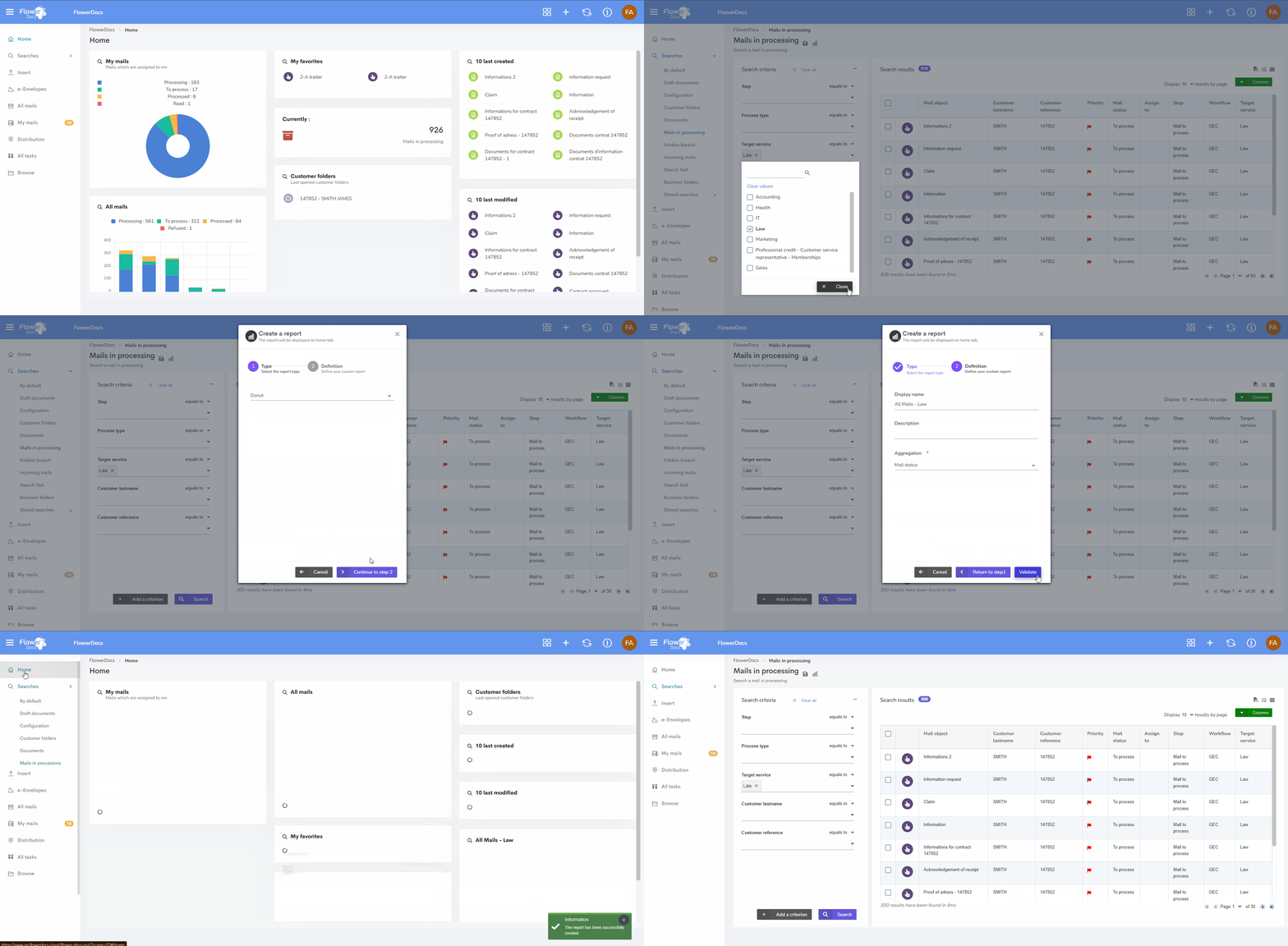
💻 Reports
Version 2025.2.0 brings several enhancements to make reports clearer and more convenient to use. The action Create your dashlet has been renamed to Create a report for better clarity.
Reports can now be displayed in full screen for improved visibility.
In addition, when users click on the title of one of their personal reports, they are redirected to the search screen used to build the report, making it easier to access the information they need.
These changes are only the beginning: further improvements to reports are planned for upcoming versions to continue enhancing the user experience.
We encourage our users to share their use cases, needs, or ideas, and to vote on our product portal to help us shape the next evolutions
💻 The ARender viewer, improvements
This new version of the viewer offers enhanced security following the correction of several CVEs.
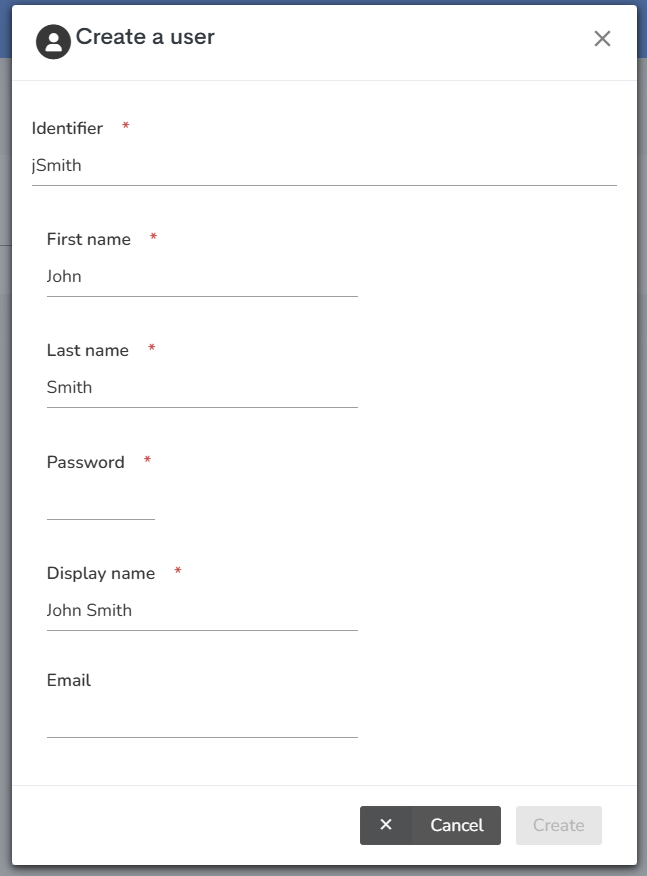
💻 Administration, users management
The user creation or update screen now clearly highlights all required fields. The "Create" or “Save” button will remain inactive until all mandatory fields are completed.
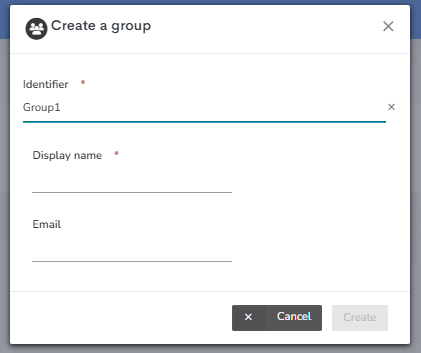
💻 Administration, groups management
The group creation or update screen clearly highlights all mandatory fields. The "Create" or "Save" button remains inactive until all mandatory fields have been filled in.
For integrators
👨💻 New Java REST Client
With version 2025.2.0, FlowerDocs introduces a dedicated Java client library to simplify and accelerate integration with our REST APIs. This client provides typed models, utility methods, and centralized handling of authentication and errors. It significantly enhances the developer experience, reduces maintenance effort during API evolutions, and ensures consistent usage across projects.
Compared to SOAP, REST is lighter, more standardized, and widely adopted in modern ecosystems. It integrates more easily with today’s frameworks, enables faster exchanges with simple formats like JSON, and reduces the technical complexity of integrations.
Ideal for partners and integrators building middleware or custom automations, this REST client shortens time-to-integration while providing a reliable, standardized foundation.
Starting with this version, the SOAP API and its associated Java client are deprecated. We strongly encourage our partners and clients to plan their migration to the Java REST client to benefit from improved performance, simplified maintenance, and stronger compatibility with modern standards, by following the upgrade notes here
👨💻 New endpoints
New REST endpoints are available:
- to create or retrieve annotations in json format instead of XFDF format in order to facilitate these actions via APIs
- to manipulate reservations by providing a list of component references
- to retrieve a token with an expiry date
See details in the upgrade notes: here
💻 Administration, directory management
To view all the groups to which a user is entitled, even if they are nested in the directory, you need to activate the user.groups.resolve-recursively=true property in the core.properties file. It is no longer possible to activate this property via the administration GUI.
For operators
💻 Security Enhancements (CVE Fixes)
Several CVEs have been addressed in this version. Specific details are withheld to protect against exploit attempts.
Bug fixes
| Bug | Linked issues |
|---|---|
| Users | |
| Administration - Within a group, it is possible to add two users with similar IDs | TMAFLW-960 |
| Administration - When modifying a team, adding or deleting a user or a group, the changes are only taken into account after clicking on "Save". If the administrator wishes to cancel these modifications, he can do so by clicking on the "Cancel" button. | TMAFLW-342 |
| The default ratio between the indexing panel and the viewer panel has been revised for 14" screens to benefit from a larger document display. | |
| Reports - Clicking on the "Full screen" action in a report displays it in full screen mode, making the information easier to read. | TMAFLW-1015 |
| History - Following a mass assignment of several tasks, when the history of one of the tasks is consulted, only one assignment fact is present, the one corresponding to it. | TMAFLW-1080 |
| Integrators | |
| CLM - When exporting configuration jobs (export-config job), only configurations are exported. Annotations are no longer present. | |
| TMAFLW-1127 | |
| Tags of type FreeList trigger the registerForFieldChange method again on the first call | TMAFLW-1127 |
Known issues
- It is no longer possible to modify group information from the FlowerDocs administration GUI. Modifications made directly in the directory are taken into account.
- Java REST client - The addFiles() method returns only 1 of the added documents instead of all documents when sending multiple documents.
FlowerDocs eProcess
Overview
No specific changes have been made to this version. It benefits from the following corrections and improvements made by FlowerDocs:
- Improved reporting
- Improved user and group management
Bug fixes
| Bug | Linked issues |
|---|---|
| Utilisateurs | |
| When the eProcess solution is deployed with the GEC solution, the "Send for information" action is not present when creating an envelope | TMAFLW-1009 |
FlowerDocs GEC
Overview
No specific changes have been made to this version. It benefits from the following corrections and improvements made by FlowerDocs:
- Improved reporting
- Improved user and group management