This version requires the following software versions as prerequisites:
- ARender: 2023.4.0
- Redis: 6.2.12
- OpenSearch: 1.3.19
Legend
- 💻 Native feature
- ⚙️ Feature requires configuration to be activated
- 👨💻 Feature requiring development to be activated
- 👑 Premium feature
Overview
Version 2025.0 brings significant improvements in terms of performance and usability. Highlights include a new version of the ARender viewer, more intuitive versioning, improvements to serial processing so that it can be used with both self-assigned and non-assigned tasks, and the ability to submit ideas directly from FlowerDocs to develop the product with our users.
Upgrade Notes
You can find out about the major technical changes in this version by consulting the upgrade notes here
For Functional Users
💻 Optimised performance !
The performance of FlowerDocs has been optimised to ensure that it runs smoothly, whatever the volume of documents, tasks and files or the complexity of the data model. In a test with 100 simultaneous users and 1,000,000 documents and tasks, the time taken for one user to complete the scenario was halved. To find out more, read the upgrade notes here
💻 ARender viewer version upgrade to 2023.4.0
This new version of the viewer brings significant ergonomic improvements and enhanced security.
-
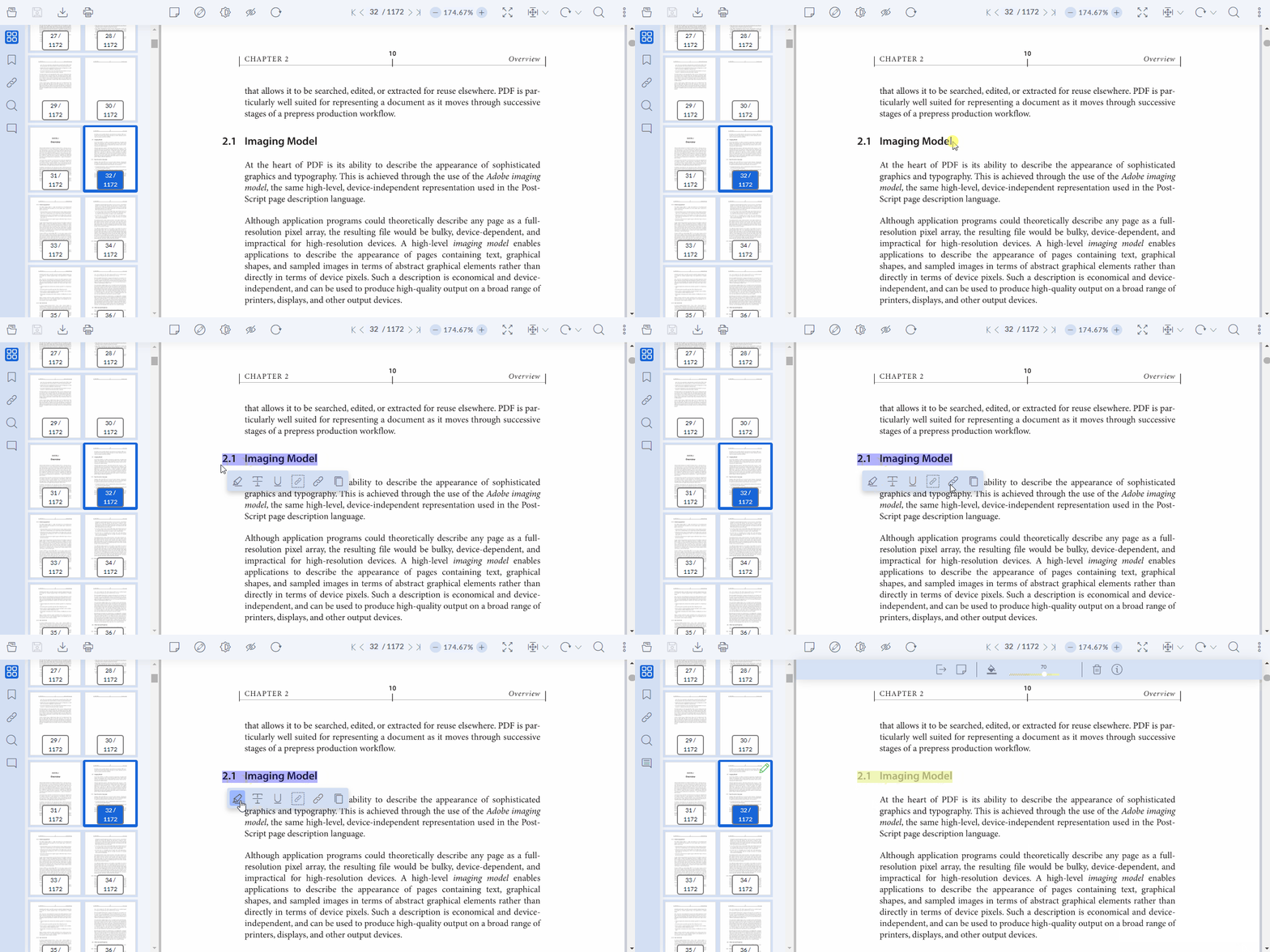
Quick menu at text selection: When a text is selected, a quick menu appears below the selected text, allowing the user to copy, highlight and underline, making interaction with documents quicker and more efficient.
-
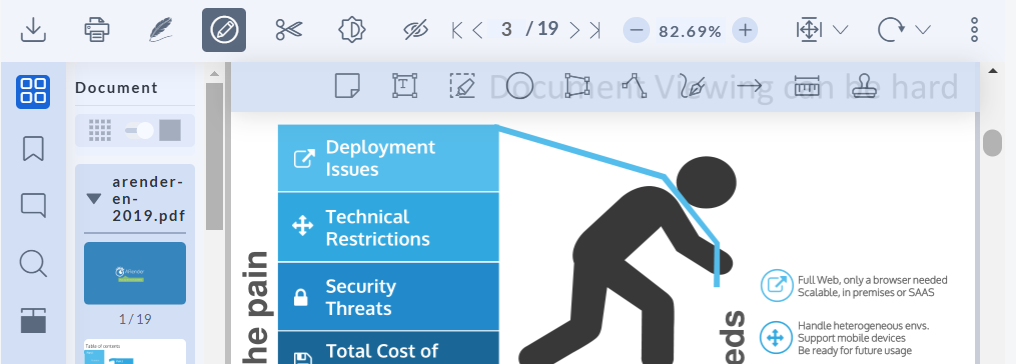
The toolbar has been simplified and grouped together for a more user-friendly experience. Annotations and buttons are neatly organised in productivity-enhancing submenus.
-
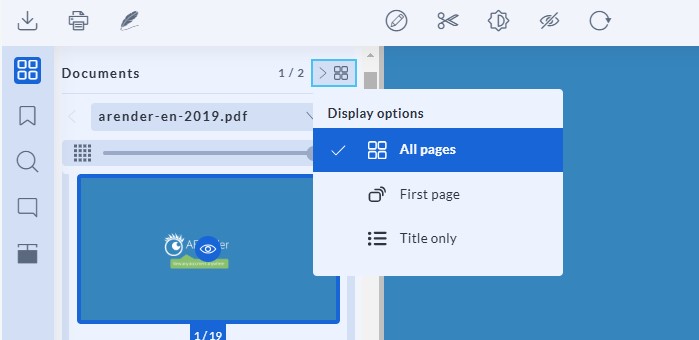
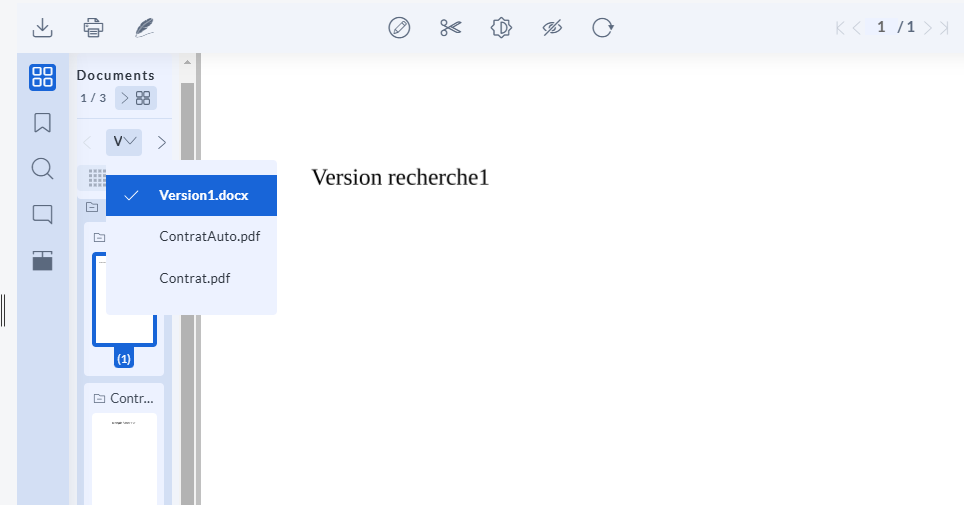
Optimized navigation within documents displayed in the viewer.
It is now possible to display all pages, only the first page or only the title for open.
 or navigate through documents using a list.
- The redact menu (beta feature) has been moved to the left to make it easier to create and view strikethroughs.
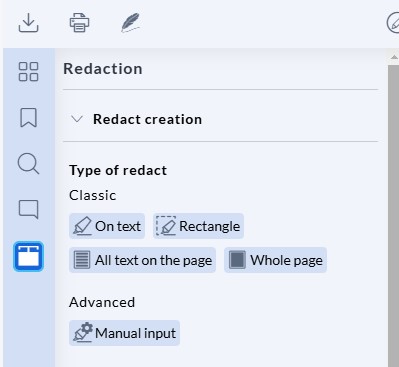
For more information, please consult the ARender release notes : here
💻 Improved UX/UI for annotations in the viewer
To take full advantage of our knowledge of annotation ergonomics, FlowerDocs uses the standard viewer configuration for annotations, including the default colors used. It is possible to modify certain standard configurations by following the documentation presented here
💻 Page rotations are automatically saved.
Page rotation management has been optimized for more efficient processing. In this new version, a user does not need to have annotation rights to save a page rotation. By default, as soon as a user has the right to consult a document, he or she has the right to rotate misaligned pages, and any changes made are automatically saved.
🛠️ Technical details :
Create a new ACL: acl-rotation, which is applied to all rotation annotations. To find out more, see the upgrade notes: here
💻 Optimized display and use of versions
The display of versions has been modified in the document history and for version consultation, to offer a more efficient user experience.
Earlier versions now have a new blue icon to identify them more quickly in history.
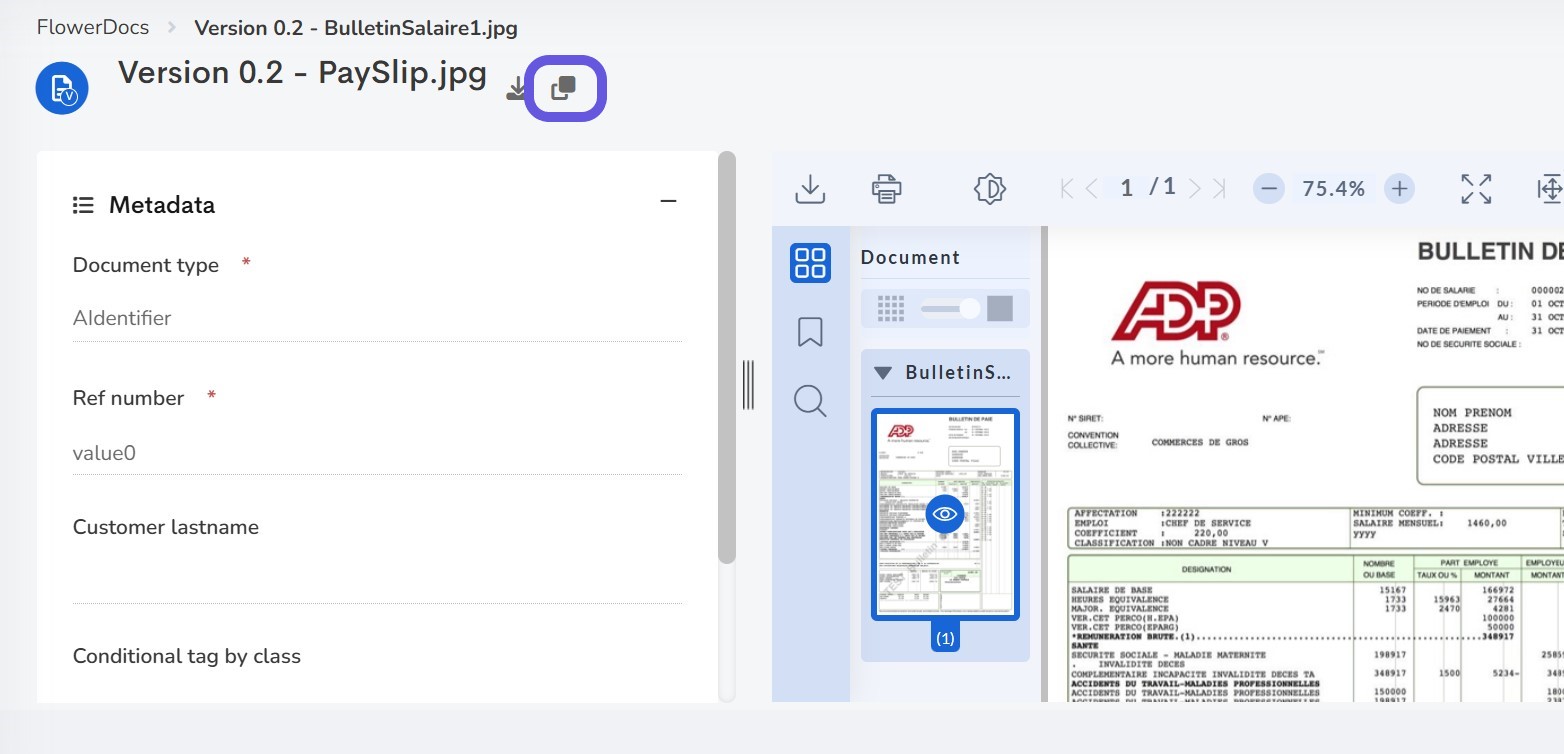
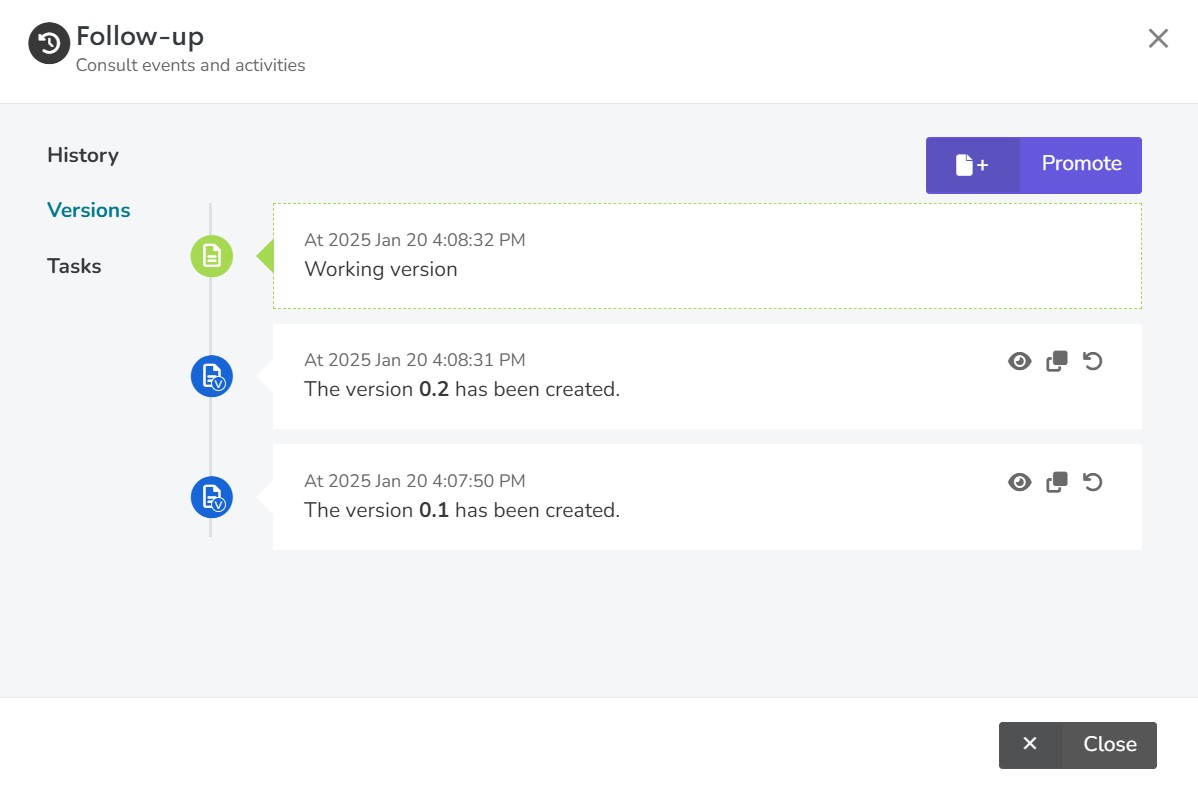 Consultation of a previous version is carried out in a new tab, in which the proposed actions have been redesigned to offer the functionalities applicable to a version, including comparison with the working version.
💻 Improved search and full-text search
Search has been improved by homogenizing search menu labels and modifying the text extraction engine for full-text search. FlowerDocs uses the extraction engine provided by ARender instead of the Tika library to guarantee better performance, particularly for the maximum number of characters extracted: our tests went up to 5 million characters. The zip export function for all documents returned as search results has been removed for performance and usability reasons. It is still possible to export the content of documents returned as results by selecting the desired ones.
👨💻 Serial processing for higher productivity
Users can index documents or process jobs from a results table, gaining efficiency through serial processing. Actions follow on from one another, without having to return to the search result or processing table.  For further information, please consult the documentation here
💻 Ideas portal : Accelerating the evolution of FlowerDocs
Thanks to the integration of an ideas portal within FlowerDocs, each user can submit the evolutions they would like to see in the product to the Uxopian Software team. This provides valuable information for prioritizing and proposing new features and significant improvements for all users.
💻 Improved accessibility
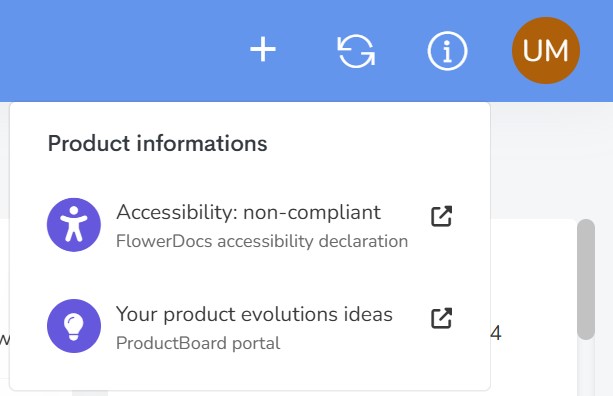
The latest version of FlowerDocs continues on its path towards compatibility with WCAG 1 level A and RGAA accessibility standards. Emphasis has been placed on administration, search and menu navigation for this release. To facilitate access to the accessibility declaration, this has been moved to the "Product information" menu.
Removed features
The following features have been removed:
- 💻 OpenSearch Dashboards, for security reasons. If you have reporting needs, you can use the WS provided by FlowerDocs to extract raw data and inject it into external reporting tools.
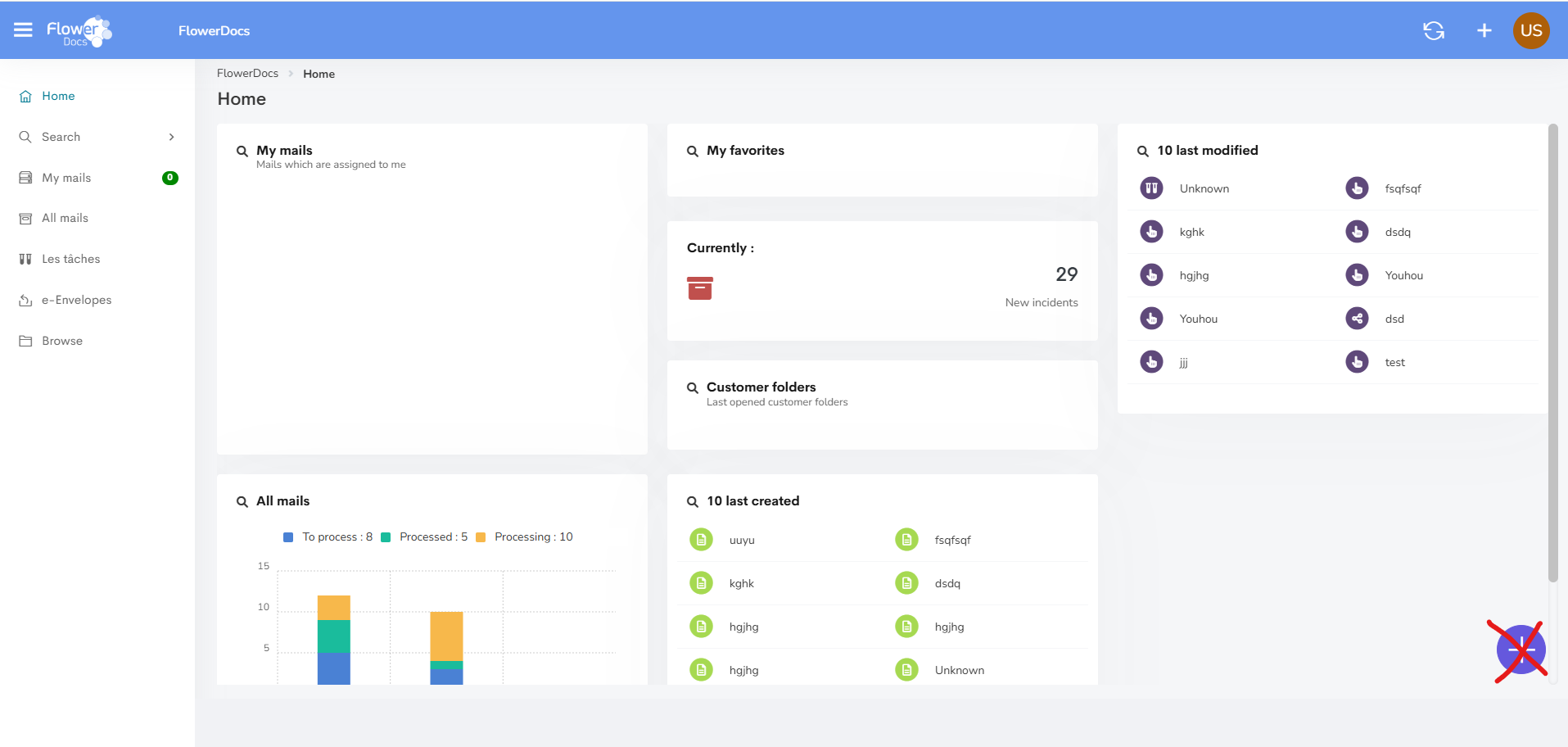
- 👨💻 The shortcut button for creating documents, tasks or folders on the home page. This feature duplicated the creation shortcut in the FlowerDocs banner.
- ⚙️ The Camunda workflow engine. In FlowerDocs, it is still possible to set up workflows via processes, task classes and a ScriptOperationHandler, or to go even faster by deploying the e-Process case manager, which enriches Flowerdocs with turnkey case management capabilities.
- ⚙️ On the administrator side, mass import of users. When initializing a project, you can use an ldif import directly from the directory to facilitate the creation of all users.
For Integrators
SOAP APIs are deprecated from this version onwards, and you must use the REST APIs offered by FlowerDocs.💻 Access to Swagger
Swagger can be accessed via a new URL: /core/swagger-ui/index.html, the old URL: /core/swagger-ui.html is no longer available.
💻 FlowerDocs Starter Client
Generation of a flowerdocs-starter client containing all the Java libraries needed for development. To take advantage of this, you need to update your application pom.
⚙️ Rights
Permission management has been simplified for the following elements:
- The READ_OBFUSCATION permission (View obfuscations) is deprecated, only the OBFUSCATE permission (Create and view obfuscations) is used.
- To update the content of a document, you must explicitly have the UPDATE_CONTENT right. The combination ADD_CONTENT and DELETE_CONTENT is deprecated, and will no longer give you the right to modify content.
👨💻 ScriptOperationHandler
The Nashorn JavaScript engine is replaced by GraalJS. To find out more, see the upgrade note here
👨💻 New endpoints around files added as Document
Two new APIs are available:
- Rename the file name associated with a document:
/core/rest/documents/\{id\}/files/\{fileId\}/name - To send, retrieve or delete the textual content of a document in FlowerDocs:
/core/rest/documents/\{id\}/files/\{file\}/content/index
👨💻 Evolution of document versioning APIs
- API WS: Document modification or deletion services return an exception if the identifier indicated does not correspond to the identifier of the current version of the document.
- API WS: A new WS REST is available to retrieve a specific version of a document:
/core/rest/documents/\{documentId\}/versions/\{versionId\} - API JS: The registerForComponentChange method is no longer called when a version is opened, so that actions can only be taken when the document is opened.
Removed features
- 👨💻 In virtual folders, the ShowNodeContent parameter was not used.
- 👨💻 The Mail Editor module.
- 👨💻 The OperationHandlerAddDisplayToSearchOperationHandler was not used.
- 👨💻 Removal of scope rules and associated endpoints: getRules, setRules and getAll from ScopeService. To find out more, see the upgrade note: here
For operators
💻 ARender viewer version upgrade to 2023.4.0
The ARender GUI is now an application in its own right, and is no longer embedded in FlowerDocs GUI. To find out more, see the upgrade notes here
💻 OpenSearch
Delete unused OpenSearch indices:
- *-flower-docs-content
- *-flower-docs-version
To find out more, see the upgrade notes here
💻 RFC standard support
FlowerDocs supports the RFC 2183 standard for the Content-Disposition header, allowing better management of accented characters.
Removed features
- 💻 FlowerDocs Management has been removed from the product, and service status information is now available via WS Actuator.
Bug fixes
| Bug | Ticket support |
|---|---|
| Functional Users | |
| ARender - Documents respect the order in which attachments are displayed, even if an eml is present as an attachment | TMAFLW-343 |
| Search - When searching on content, no empty columns are added to the result table | TMAFLW-563 / TMAFLW-569 |
| Search - LSearches are efficient even when there are a large number of ACLs | TMAFLW-615 |
| Search - When a search is run for the first time, if the value of a suggestion is validated by pressing Enter, it is taken into account | TMAFLW-700 |
| Search - After a reset, criteria operators are reset to their initial values | TMAFLW-829 |
| Full-text search - Content search is functional for documents in landscape format | TMAFLW-489 |
| Full-text search works with FlowerDocs encryption | TMAFLW-791 |
| Document - The "Add new version" function is not operational even if the document has no content | TMAFLW-613 |
| For Date tags, the value displayed in the tooltip corresponds to the value entered | TMAFLW-680 |
| Report on home page (Dashlet) - Once a report has been modified, it can be clicked to access the search function | TMAFLW-804 |
| A Boolean tag cannot be modified if configured as read-only | TMAFLW-805 |
| A document can be created or updated with a date between 07/09/1969 07:13:21 and 28/12/1969 15:48:44 | TMAFLW-853 |
| Integrators | |
| Administration - A user can be added to an empty group | TMAFLW-802 |
| API JS - setReadOnly works on search forms | TMAFLW-721 |
| API WS - Updating a document via WS without defining a file ID preserves the content and only updates the tags | TMAFLW-733 |
| API - WS error code review | TMAFLW-862 |
| OH - In the event of multiple component updates, processing is no longer stopped at the first exception | TMAFLW-600 |
| CLM - The password encryption job is functional | TMAFLW-712 |
| Permission - Ability to update document tags with UPDATE permission only | TMAFLW-734 |
| Permission - Access to the document or its contents with READ and READ_CONTENT permissions respectively | TMAFLW-788 |
| Operators | |
| Core starts up with FileSystem connector and encryption enabled | TMAFLW-776 |
| API WS - The endpoint retrieving the connection history returns the connection history with or without a specified date | TMAFLW-644 |
Known issues
- Full-text search - Text extraction from e-mail documents no longer works
- Search - When using a date criterion in a full date format, hours, minutes and seconds are no longer taken into account.
- Serial processing - When serial processing is enabled in a menu, when the user opens a component (document, task or folder) then a pop-up (adding a document, for example) then cancels, the user returns to the menu instead of to the open component.
- Result table - Unstable state of icons displayed for tasks if the class id is not present in the columns and the columns are modified.