ARender v2026.4.0 - Release Notes
ARender 2026.4.0 is the fourth minor release on the 2026 line. ARender Horizon can now display several documents side by side (multi-view), shows the table of contents of PDF documents, adds comment zones, and moves its whole interface onto the shared Uxopian design system. On the backend, the Rendition API now tells integrators when a document cannot be opened because it is password-protected or corrupted, and ARender Classic shows that reason to the user. Classic annotation and navigation fixes, faster search on very large PDFs and security hardening complete the release.
As in the previous releases, the changes below are grouped by viewer: a shared Security section, then ARender Horizon (React), ARender Classic (GWT), and finally Rendition for backend, conversion and integration changes that apply to both viewers.
See the v2026.4.0 upgrade notes for step-by-step migration instructions.
Security
Applies to the whole platform (both viewers).
Security fixes and dependency updates
Changed - This release includes security hardening across the platform together with updates to third-party dependencies and container base images to address known vulnerabilities. For details on the specific issues addressed, please contact ARender support.
ARender Horizon (React)
Changes specific to the React viewer (ARender Horizon).
New features and improvements
Multi-view
New - Several documents can now be displayed side by side, each in its own panel. From the thumbnail context menu, a document opens in a new panel; a panel can also be added at the boundary between two existing panels. Panels can be resized and closed, and the panel the user works in is highlighted as the active one. Each panel header shows the path of its document and lets the user switch to another document of the set. The thumbnails and the comments panel drive the active panel, and annotations can be created in any panel.
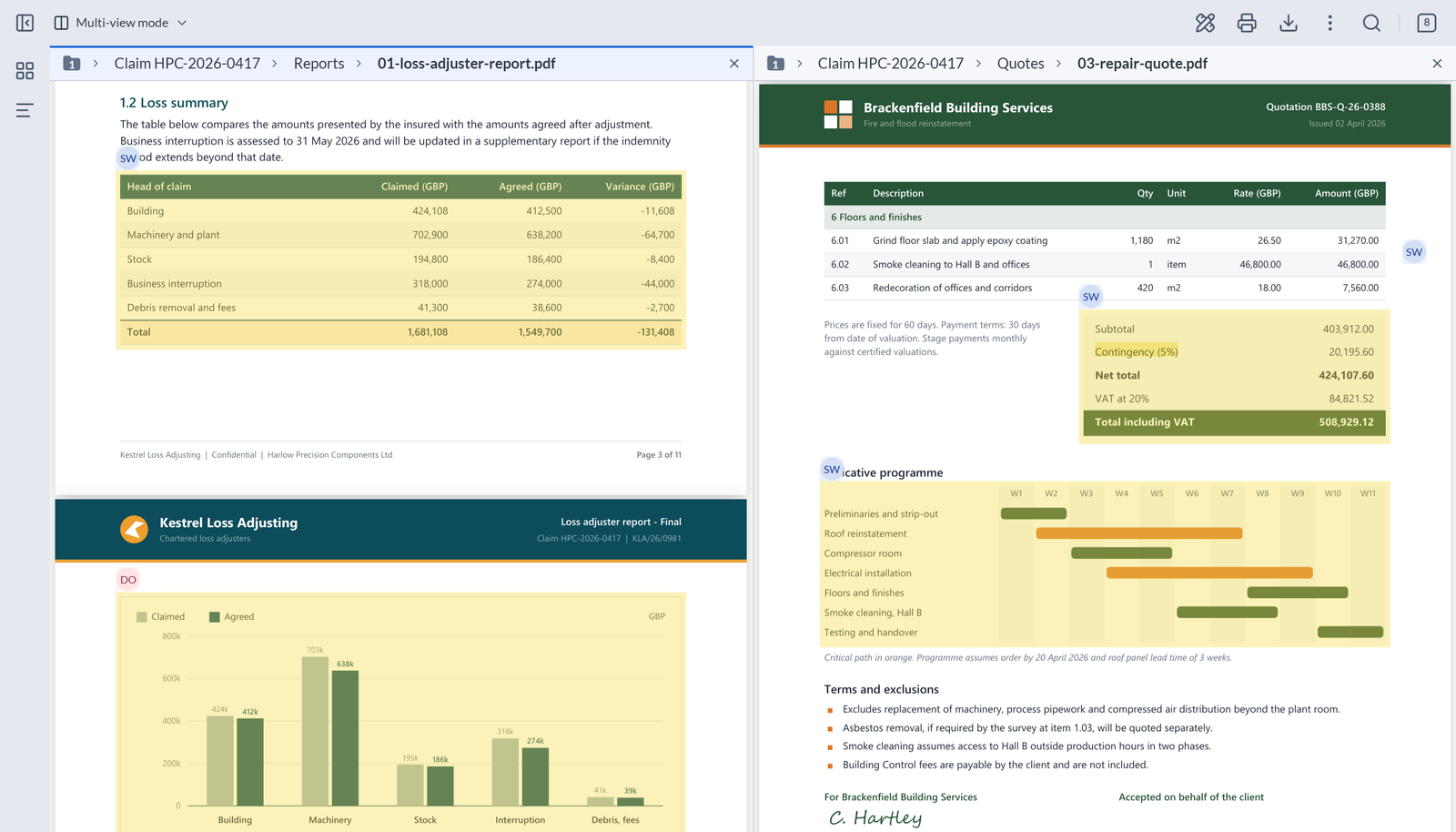
The JavaScript API follows the panels: commands act on the active panel, new calls list, open, activate and close panels, and events say which panel they come from. Existing calls keep working unchanged in single view.
Table of contents
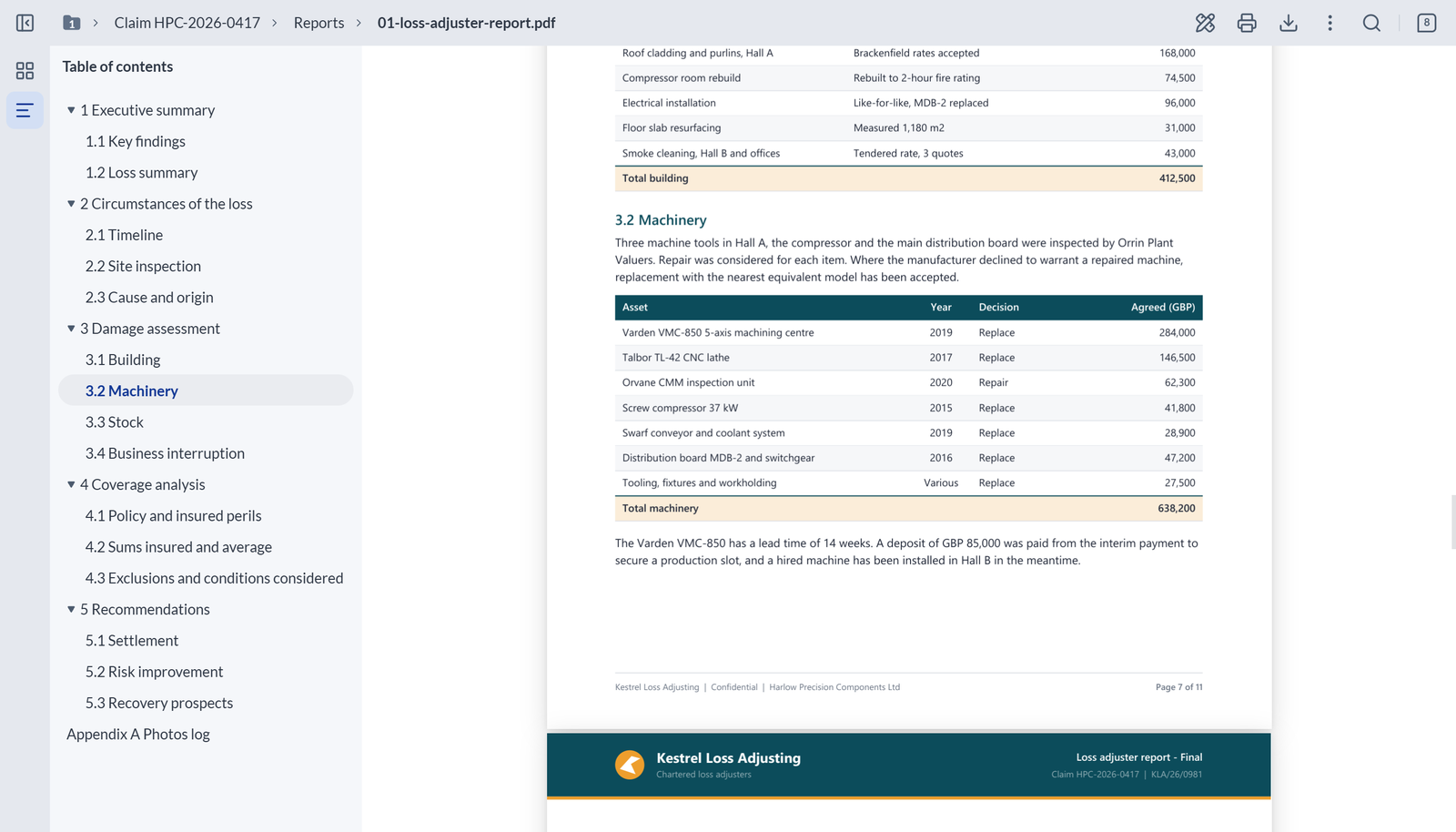
New - When a PDF document carries an outline, a Table of contents panel is available in the side panel. It keeps the hierarchy and order of the document, levels can be expanded and collapsed with the mouse or the keyboard, and a click on an entry jumps to its target. The entry matching the current reading position is highlighted while scrolling. The panel is read-only, and it is hidden when the document has no outline.
Comment zones
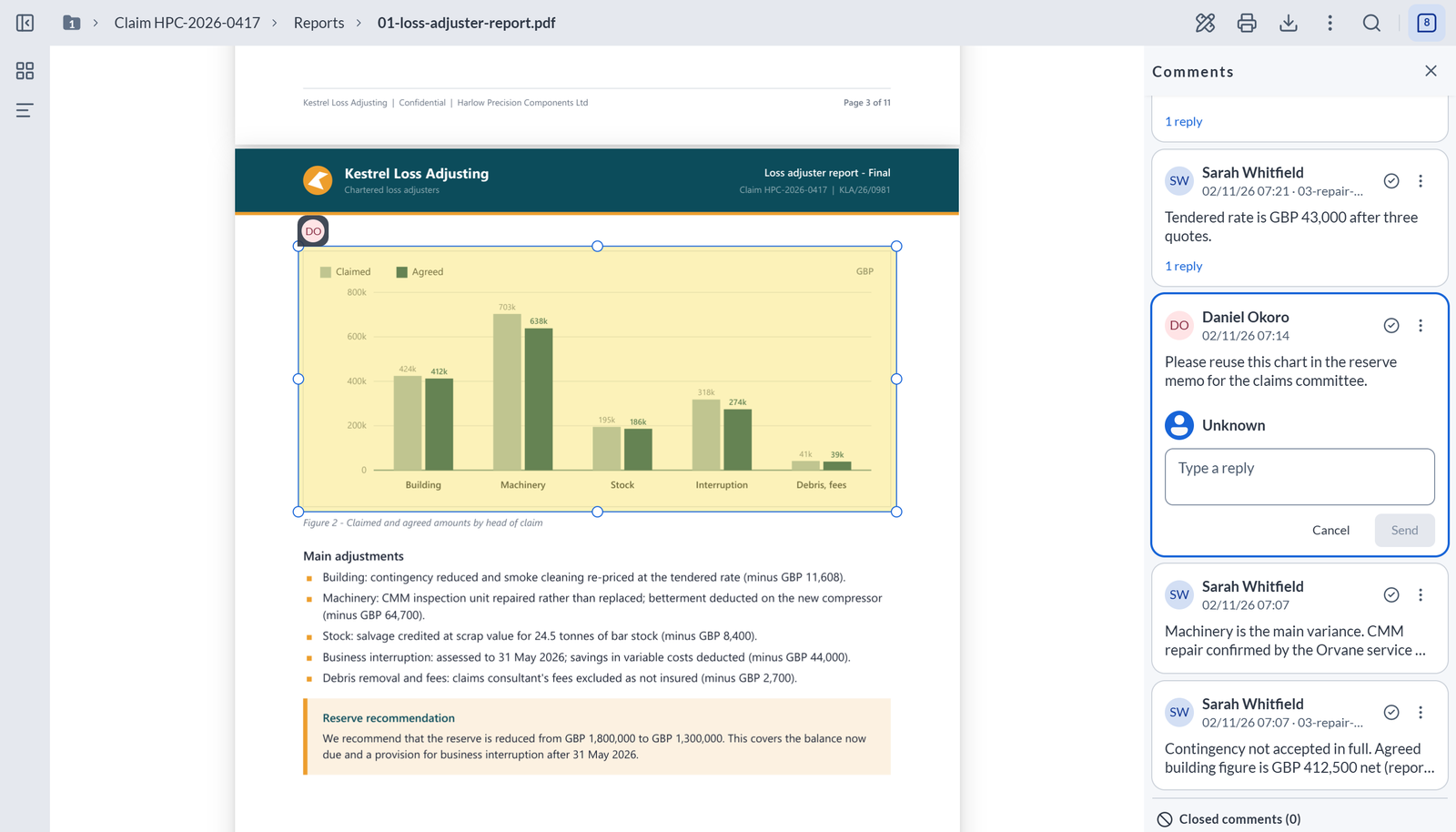
New - A comment can now be attached to a zone of the page, and not only to a point. A comment zone has its own thread of replies and a card in the comments panel, a review status, and it can be edited and deleted like a comment. Comment and comment zone handling is also smoother: clicking elsewhere in the document releases the selected comment without losing a reply being typed, a comment zone preview shows at the zone's pin, the keyboard can tab through every annotation without being trapped in a popup, and the cursor stays a steady crosshair while drawing an annotation.
Refreshed interface
Changed - The whole Horizon interface now uses the shared Uxopian design system: top bar, thumbnail panel, floating bars, comments panel, download and print dialogs, and icons. The top bar stays fixed while the document scrolls and shows the path of the document within its set, the search bar floats over the document, the comment count is shown in the top bar, and zoom levels are chosen from inside the zoom field.
Thumbnails panel
Removed - The document selector of the thumbnails panel is removed: the document path in the top bar replaces it. Selecting several thumbnails with Ctrl+click is no longer available.
Faster first display
Changed - The viewer now loads the code of heavier features (Excel data view, translations, thumbnails) only when they are used, so the initial download is less than half its previous size. The type of each document in a set is read from the set structure, so fewer requests are sent when a set opens.
Developer notes
Viewer distribution folder
Changed - The viewer package is now distributed as a folder whose entry is embed.js, with the on-demand features as separate files beside it. Serve the folder as a whole and load embed.js by its plain URL: copying embed.js alone no longer works. The published npm package now contains this folder and the TypeScript definitions only, and the Horizon Docker image no longer serves embed.js at its root.
Viewer styles
Changed - The viewer styles now come from the Uxopian design system and are scoped to the viewer. The viewer no longer ships a global CSS reset (normalize.css): check the host pages that relied on it.
JavaScript API: annotations of any displayed document
New - Annotation calls accept an optional document id, to act on the annotations of any document displayed in a panel, and a new get call returns the annotations matching a query.
Bug fixes
Excel data view
Fixed - In a set that holds a spreadsheet, a document opened right after the spreadsheet is no longer taken for one, and the full-screen spreadsheet dialog is displayed correctly again.
ARender Classic (GWT)
Changes specific to the Classic (GWT) viewer and its connectors.
New features and improvements
Reason shown for a document that cannot be opened
New - When a document is password-protected or corrupted, the viewer now says so, instead of showing a generic error. This also applies to the attachments of an email and to the files of an archive.
Faster search on very large PDFs
Changed - Advanced search on very large PDF documents (tens of thousands of pages) is faster, shows a progress indicator from the start, clearly signals when it is complete, and no longer stops silently before returning every result.
Developer notes
Navigation to the top of the view
Changed - The JavaScript API askChangePage call accepts an optional fourth argument, centerPosition. When it is false, the target position is placed at the top of the view, like a click on an internal hyperlink. When it is omitted, the target is centered as before.
Bug fixes
Annotations missing at load
Fixed - An annotation with no position no longer prevents all the annotations of a document from being displayed when it is first opened.
Annotation default properties
Fixed - The default bold, italic and underline style set in the configuration is now applied to new comments and free text annotations, and the annotation toolbar buttons reflect it.
Document navigator initial width
Fixed - When documentnavigator.initialWidth is set to Hidden or Reduced, the navigator now returns to that state after the user expands and collapses the side panel.
Rendition
Backend, conversion and integration changes that apply regardless of the viewer.
New features and improvements
Faster audio conversion
Changed - Audio files are converted two to three times faster than in the previous 2026 releases.
Developer notes
Password-protected and corrupted documents
New - When a document cannot be opened because it is password-protected or corrupted, its layout, page image and text calls now answer HTTP 422 with an error code, PASSWORD_PROTECTED or CORRUPTED, instead of a generic server error. This covers PDF, Office and OpenDocument files, archives, and the children of emails and archives, each checked through its own layout call. A 422 tells clients and retry policies not to retry. Other errors keep their previous behavior: an unsupported format still answers 406.
PDF engine upgrade
Changed - The PDFOwl rendering engine is upgraded to 1.24-34, which reports password-protected and corrupted PDFs to the Rendition API.
Bug fixes
Signatures reported as altered
Fixed - PDF signatures that embed their certificate chain as an array are no longer reported as altered. Their trust is now evaluated as for any other signature.
Changelog
| Summary | Viewer | Type | Key | Linked Issues |
|---|---|---|---|---|
| Security hardening | Classic | Security | AR-18817 | TMAPR-6009 |
| Security hardening | Classic | Security | AR-18812 | |
| Security hardening | Both | Security | AR-18824 | |
| Dependency security update | Both | Security | AR-18826 | |
| Dependency security update | Both | Security | AR-18869 | |
| Dependency security update | Both | Security | AR-18896 | |
| Dependency security update | Both | Security | AR-18903 | |
| Dependency security update | Both | Security | AR-18940 | |
| Multi-view: viewer support for several documents | Horizon | New feature | AR-18601 | |
| Multi-view: side-by-side panels | Horizon | New feature | AR-18842 | |
| Multi-view: open a document in a new panel from the thumbnails | Horizon | New feature | AR-18843 | |
| Multi-view: document path and switcher in the panel header | Horizon | New feature | AR-18844 | |
| Multi-view: thumbnails and comments panel drive the panels | Horizon | New feature | AR-18845 | |
| Multi-view: annotate in any panel | Horizon | New feature | AR-18847 | |
| Multi-view: JavaScript API for panels | Horizon | New feature | AR-18849 | |
| Multi-view: add a panel between two panels | Horizon | New feature | AR-18850 | |
| Table of contents panel | Horizon | New feature | AR-18641 | |
| Comment zones | Horizon | New feature | AR-18648 | |
| Comment and comment zone selection, focus and cursor | Horizon | Evolution | AR-18852 | |
| Design system migration | Horizon | Evolution | AR-18762 | |
| Interface sizes aligned on the design system | Horizon | Evolution | AR-18791 | |
| Generic components replaced by the design system ones | Horizon | Evolution | AR-18801 | |
| Design system kept inside the host page | Horizon | Evolution | AR-18805 | |
| Download and print dialogs | Horizon | Evolution | AR-18808 | |
| New icons | Horizon | Evolution | AR-18809 | |
| Top bar: floating search bar and comment count | Horizon | Evolution | AR-18818 | |
| Thumbnail panel | Horizon | Evolution | AR-18819 | |
| Floating bars and quick menu | Horizon | Evolution | AR-18820 | |
| Comments panel and thread | Horizon | Evolution | AR-18825 | |
| Zoom levels in the zoom field and document icons | Horizon | Evolution | AR-18836 | |
| Document path layout | Horizon | Evolution | AR-18856 | |
| Fixed top bar while the document scrolls | Horizon | Evolution | AR-18430 | |
| Document path in the top bar | Horizon | Evolution | AR-18434 | |
| Smaller initial download of the viewer | Horizon | Evolution | AR-18710 | |
| Document type read from the set structure | Horizon | Evolution | AR-18683 | |
| Document after a spreadsheet taken for one, broken full-screen spreadsheet dialog | Horizon | Bug fix | AR-18855 | |
| Reason shown for a password-protected or corrupted document | Both | New feature | AR-18139 | TMAPR-6674, TMAPR-6955, TMAPR-6984 |
| Slow and incomplete advanced search on very large PDFs | Classic | Bug fix | AR-18776 | TMAPR-7051 |
askChangePage cannot place the target at the top of the view | Classic | Evolution | AR-18687 | TMAPR-6717 |
| Annotation with no position blocks all annotations at load | Classic | Regression | AR-18717 | TMAPR-5817 |
| Default bold, italic and underline style not applied | Classic | Bug fix | AR-17334 | TMAPR-6111, TMAPR-6158 |
| Navigator does not return to its initial width | Classic | Bug fix | AR-18383 | TMAPR-6841 |
| Faster audio conversion | Both | Evolution | AR-18913 | |
| PDF engine reports protected and corrupted PDFs | Both | Evolution | AR-18714 | |
| PDF signature reported as altered for a certificate array | Both | Bug fix | AR-18667 | TMAPR-6666, TMAPR-4681 |